GSMWolf MTK Tool Download FRP Remove & Bootloader Unlock
GSMWolf MTK Tool Download – MediaTek Servicing and Repair Guide
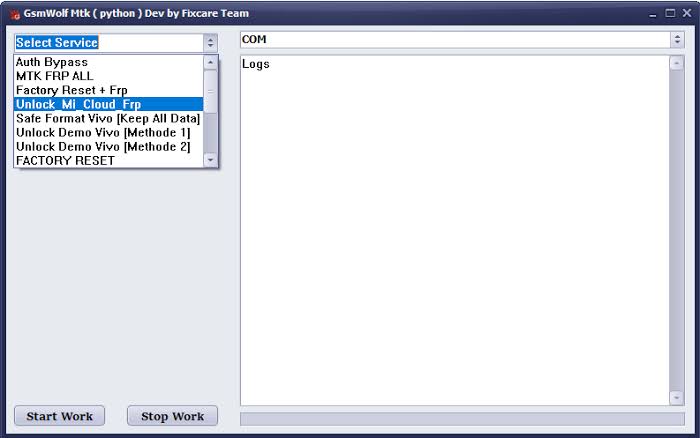
GSMWolf MTK Tool is presented as a mobile servicing utility focused on compatible MediaTek (MTK) devices. Its title highlights FRP-related servicing and bootloader operations, which are common topics in Android repair. The exact features available depend on the tool version, device model, chipset configuration, and Android security patch. Users should verify the software’s documentation and supported-device list before installing it or attempting a repair.
What Is GSMWolf MTK Tool?
GSMWolf MTK Tool Download is described as a utility for technicians and experienced users working with supported MediaTek-powered smartphones. MTK servicing applications may offer device communication, identification, diagnostic functions, and selected software-maintenance options.
MediaTek devices can differ considerably in hardware configuration and security implementation. As a result, compatibility with one MTK phone does not guarantee support for another. Always check the exact model and tool release before beginning a servicing operation.
Key Features of GSMWolf MTK Tool:
MediaTek Device Detection
- MKT Tool Device detection helps identify a connected phone and establish communication with supported hardware. Depending on the release, the tool may require specific USB drivers or a particular connection mode to recognize a device correctly.
FRP-Related Servicing
- Factory Reset Protection (FRP) is an Android security feature that helps protect a device after a factory reset. If you own a phone that requests account verification, use the Google Account previously associated with it or follow Google’s official account-recovery process. Any repair involving FRP should be limited to devices you own or are explicitly authorized to service.
Bootloader-Related Operations
- A bootloader helps control how a device starts and loads its operating system. Bootloader operations can vary by manufacturer and model, and unlocking may erase user data or affect device security and warranty status. Check the manufacturer’s official instructions and confirm that the operation is supported before proceeding.
Android Software Maintenance
- Compatible MTK servicing utilities may assist with selected software troubleshooting tasks. Available functions depend on the device, firmware, and installed release. A software tool cannot resolve every issue, particularly when the underlying cause is hardware-related.
Windows-Based Servicing Workflow
- If GSMWolf MTK Tool is distributed as a Windows application, check the stated system requirements and driver instructions. A reliable USB cable, a stable connection, and compatible drivers may be necessary for supported operations.
Why MediaTek Compatibility Matters?
MediaTek powers smartphones across a wide range of brands and price categories. Although devices may share the same chipset family, their firmware, partition layouts, security patches, and manufacturer configurations can differ.
For this reason, users should confirm compatibility with the exact device model instead of relying on chipset branding alone. Using an unsuitable operation or firmware package can cause data loss or software failure.
How to Prepare Before Using GSMWolf MTK Tool?
Before starting a servicing task, follow these precautions:
- Confirm the phone’s exact model and MediaTek platform.
- Check whether the installed tool version supports the device.
- Back up important data whenever possible.
- Install the required drivers from a trusted source.
- Use a reliable USB cable and stable computer connection.
- Review the documentation for the selected operation.
- Verify firmware compatibility before performing firmware-related maintenance.
These steps can help prevent avoidable connection issues and reduce the risk of device damage.
Common Problems and Troubleshooting:
Device not detected: Check the USB cable, USB port, driver installation, and supported connection mode. Confirm that the device is compatible with the tool.
Tool does not launch: Review the Windows requirements and verify that the installation package comes from a trustworthy source. Scan it with reputable security software before opening it.
A servicing operation fails: Review the error message and check the model, firmware version, and connection stability. Avoid repeating potentially destructive operations without understanding the cause.
The phone requests account verification: Use the previously associated Google Account or official account-recovery support. If the device was purchased second-hand, contact the seller for assistance with legitimate ownership verification.
Safety and Compatibility Considerations:
GSMWolf MTK Tool should not be assumed to support every MediaTek device or Android security version. Unverified setup files may contain malicious software, and incorrect servicing operations can erase data or make a phone unusable.
Download software only from a source you trust, review its documentation, and avoid disabling security protections to run unknown files. Perform repairs only on devices you own or have explicit permission to service.
Final Words:
GSMWolf MTK Tool is presented as a MediaTek-focused Android servicing utility associated with device detection and selected repair workflows. Its advertised FRP and bootloader functions should be verified against the actual release and supported-device list. Proper preparation, reliable drivers, and responsible use are essential for safer mobile servicing.