LU WiFi A12+ Tool Fixes It Without Jailbreak Latest version 2026
Stuck on iCloud Activation Screen? LU WiFi A12+ Tool Fixes It Without Jailbreak
The LU WiFi A12+ Tool is an Apple device servicing utility designed for selected iPhones and iPads experiencing iCloud Activation Lock or activation-related issues. It is commonly discussed as a Wi-Fi-based activation utility for compatible devices, with certain versions advertised as working without a traditional jailbreak. However, compatibility depends on the exact iPhone or iPad model, iOS version, and tool release, so users should verify support before purchasing or using it.
What Is LU WiFi A12+ Tool?
LU WiFi A12+ is a Windows-based utility associated with Apple device servicing and activation troubleshooting. It is intended for supported devices using Apple A12 or newer processors, although some releases also advertise features for older devices. Its available functions and supported models may differ between versions.
The tool is primarily aimed at technicians and users who need to assess activation-related problems on compatible devices. Before using any third-party utility, confirm that the device belongs to you or that you have permission from its owner.
Key Features of LU WiFi A12+ Tool:
Activation Compatibility Checking
- Some releases advertise a device support checker that helps determine whether a connected iPhone or iPad is compatible with the available service. Checking compatibility first can help prevent errors caused by unsupported models or iOS versions.
No-Jailbreak Claims for Supported Devices
- LU WiFi A12+ is promoted for certain workflows that do not require a traditional jailbreak. This does not mean every iPhone or iOS version is supported, and advertised features should be verified against the exact release before use.
Wi-Fi-Based Servicing
- The utility is associated with Wi-Fi-based activation services for compatible devices. The available functionality may vary, and users should not assume that every device will retain cellular service, iCloud access, notifications, or all other features after a third-party activation procedure.
Support for Selected iPhones and iPads
- The name A12+ indicates a focus on newer Apple hardware, while some published descriptions also mention selected older models. Actual compatibility must be confirmed using the tool’s current support information rather than relying on the product name alone.
Windows-Based Interface
- The software is promoted for use on Windows computers. A compatible computer, working USB cable, stable connection, and any required software or licensing may be necessary, depending on the version and service offered.
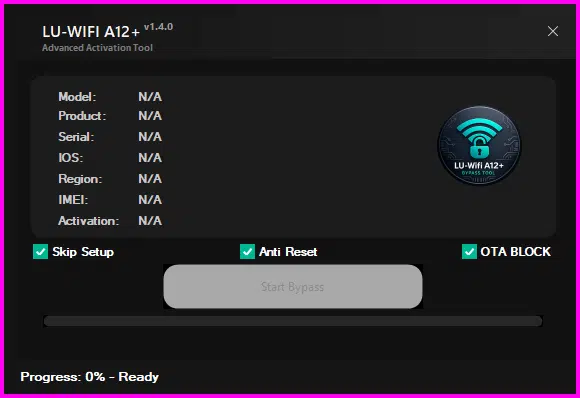
Important Things to Check Before Using the Tool:
Before using LU WiFi A12+, identify the exact device model and installed iOS version. Review the release notes and compatibility information, and download software only from a source you trust. Avoid unofficial packages that request unnecessary credentials or security-sensitive information.
If the device displays Activation Lock, the most reliable solution is to enter the Apple Account previously associated with it or ask the previous owner to remove the device from their account. If you can provide proof of purchase, Apple Support may be able to review your request. A third-party utility cannot guarantee permanent activation or full access to every Apple service.
Is LU WiFi A12+ Tool Free?
Availability and pricing can vary by release and service provider. Some listings describe LU WiFi A12+ as a paid tool or activation service, so users should confirm the total cost, supported device conditions, refund policy, and licensing requirements before paying. Be cautious of websites promising universal, free, or guaranteed activation.
Common Compatibility Problems:
Users may encounter errors if the device is unsupported, the iOS version is incompatible, the USB connection is unstable, or the software cannot communicate with the device. An activation problem may also be related to Apple’s activation servers, network connectivity, or an account-related restriction.
For normal activation issues, check the internet connection, restart the device, and try activation again. If Activation Lock specifically requests another person’s Apple Account, use Apple’s official account recovery or previous-owner removal process.
Final Words:
LU WiFi A12+ Tool is advertised as an Apple device servicing utility for selected activation-related cases, including certain workflows promoted as requiring no jailbreak. Its actual capabilities depend on the release, device model, and iOS version, so verify compatibility and service limitations before proceeding. For devices protected by Activation Lock, prioritize authorized recovery methods to protect personal data and avoid unreliable or misleading services.