Sam Skip Tool V41 Download Ultimate Solution For Frp And Adb Issues Updated 2026
Sam Skip Tool V41 Ultimate Solution for FRP and ADB Issues
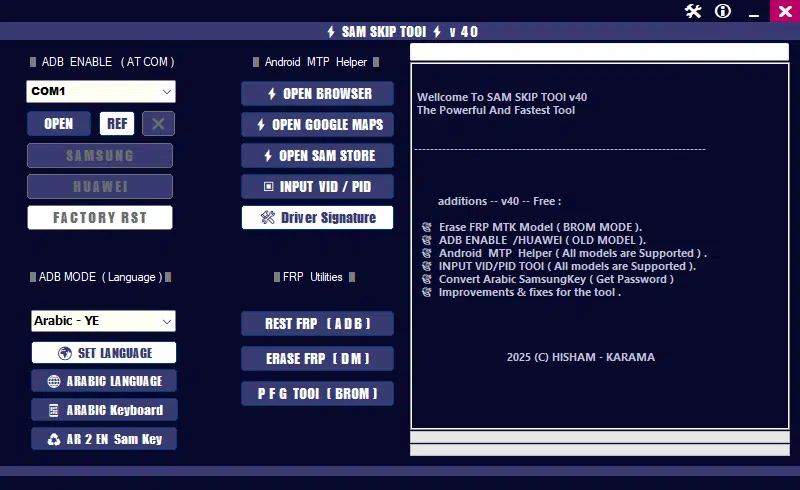
Sam Skip Tool V41 Download is a Windows-based Android servicing utility associated with mobile phone troubleshooting, device communication, and selected FRP- and ADB-related functions. It is primarily discussed among GSM technicians and mobile repair professionals who work with compatible Samsung and other supported Android devices. The tool is designed to assist with certain servicing tasks involving device connection modes, Android Debug Bridge (ADB) communication, and system restoration workflows. Its available features depend on the device model, chipset, Android version, security patch, and installed drivers. Before using Sam Skip Tool V41, users should verify that the package comes from a trusted source and that their device is supported.
What Is Sam Skip Tool V41?
Sam Skip Tool V41 Download is a mobile servicing utility intended to help technicians handle selected Android software issues through a Windows computer. It is associated with different device communication modes and troubleshooting functions that may be useful when a phone encounters setup problems or cannot communicate correctly with a computer.
The tool is commonly discussed in connection with Samsung devices and selected MediaTek-based phones. However, support is not universal, and a feature available for one model may not work on another. Users should confirm the exact capabilities of their version before relying on it for a repair.
Key Features of Sam Skip Tool V41:
1. FRP-Related Servicing
- Factory Reset Protection (FRP) is an Android security feature that helps prevent unauthorized use of a device after a factory reset. Sam Skip Tool V41 Download is advertised by third-party sources as providing selected FRP-related servicing functions for compatible devices.
- These functions should only be used on phones the user owns or is explicitly authorized to service. If a phone requests the previously synchronized Google account, the safest option is to complete Google’s official account recovery and device verification process.
2. ADB Communication Support
- Android Debug Bridge is a development and servicing interface that allows a computer to communicate with a compatible Android device. Sam Skip Tool V41 Download is associated with certain ADB-related troubleshooting and connection functions.
- ADB availability depends on the device’s configuration, USB debugging authorization, drivers, and software state. A tool cannot guarantee ADB access when the phone does not permit it.
3. Multiple Connection Modes
- Different Android devices use different connection modes for diagnostics and software servicing. Sam Skip Tool V41 Download is discussed in relation to modes such as ADB and MediaTek BROM, although exact support depends on the release and compatible hardware.
- Choosing the wrong mode or using an incompatible operation can cause errors, so technicians should check device-specific documentation before proceeding.
4. USB Driver Compatibility
- Proper USB drivers help Windows identify connected phones and expose the correct communication interface. Driver problems are a common reason servicing utilities fail to detect a device.
- Users should install trusted drivers intended for their phone or chipset and confirm that Windows recognizes the connected hardware before starting a repair.
5. Android Troubleshooting
- The utility may be useful in selected servicing workflows involving connection issues or devices stuck during initial setup. Results vary according to the underlying problem, Android release, and device security configuration.
- Not every setup-screen issue is caused by software corruption, and not every problem can be fixed through a Windows servicing utility.
System Requirements:
Before installing Sam Skip Tool V41 Download, prepare the following:
- A Windows computer compatible with the tool package.
- A suitable USB data cable.
- Correct USB drivers for the connected Android device.
- A compatible phone and supported connection mode.
- Administrator permission for installation when required.
- Adequate storage and a stable connection if the tool requires online resources.
The precise Windows versions, processor requirements, and additional dependencies should be confirmed from the documentation accompanying the verified package.
How to Prepare Sam Skip Tool V41?
For a legitimate device repair, use this general preparation checklist:
- Identify the exact phone model and Android version.
- Confirm ownership or obtain authorization from the device owner.
- Back up accessible personal data before any reset or firmware-related work.
- Obtain the software package from a source you can verify.
- Install the appropriate device drivers and check Windows device recognition.
- Review the documentation for supported models and known limitations.
- Use only operations intended for the specific device and authorized repair task.
These preparation steps can help prevent avoidable connection errors and reduce the risk of data loss.
Common Problems and Solutions:
Tool Does Not Detect the Phone
Check the USB cable, USB port, device drivers, and Windows Device Manager. Some cables support charging but not data transfer. Also confirm that the phone is in a supported connection mode.
ADB Is Not Available
ADB communication may require USB debugging to be enabled and the computer to be authorized on the phone. If the device cannot be unlocked or the required authorization is unavailable, use the manufacturer’s supported recovery or service process.
FRP Verification Remains After a Reset
FRP is an account-protection mechanism, not simply a software error. Follow the on-screen verification instructions, recover the previously synchronized Google account if necessary, or contact the manufacturer or an authorized service provider with proof of ownership.
The Operation Fails on a Newer Android Version
Security updates and changes in device firmware can affect compatibility. Check whether the tool version explicitly supports the device’s model and security patch rather than assuming that an older release will work.
Driver or Connection Errors
Remove conflicting or outdated drivers only when you understand their purpose, then install the correct package from a trusted manufacturer or chipset source. Restart Windows if the installation instructions require it.
Is Sam Skip Tool V41 Suitable for Every Android Phone?
No. Compatibility depends on the hardware platform, model, Android version, security patch, and available connection modes. Although third-party descriptions mention Samsung and MediaTek-related workflows, that does not establish support for every device in those categories.
Sam Skip Tool V41 should be treated as a version-specific utility rather than a universal Android repair solution. Verify its supported-device information before installation or use.
Download Sam Skip Tool V41 Safely:
When looking for Sam Skip Tool V41, prioritize a reputable source that clearly identifies the release and provides consistent installation information. Avoid repackaged files from unknown websites, particularly installers that request unnecessary permissions or ask users to disable security protection without a clear reason.
Scan downloaded files with reputable security software and keep Windows updated. Be cautious of websites promising guaranteed FRP removal or universal ADB access, as these claims may not reflect actual compatibility.
Final Words:
Sam Skip Tool V41 is discussed as an Android servicing utility for selected FRP-related, ADB communication, and device troubleshooting tasks. It may be relevant to technicians working with compatible phones, but its capabilities and success depend on the specific device and software environment. For reliable results, verify compatibility, protect user data, use trusted installation files, and rely on official account recovery or authorized service procedures when Android security verification is involved.