Mamalona Tool Unlocking KG Locked Devices with ADB & Fastboot Latest Setup 2026
Mamalona Tool Unlocking KG Locked Devices with ADB & Fastboot
Mamalona Tool is an Android servicing utility associated with ADB and Fastboot-based device management. It is promoted for working with Samsung devices and other supported Android phones, particularly for troubleshooting software and configuration issues. Because KG (Knox Guard) is a security and device-management system, any KG-related servicing should only be performed on devices that are legitimately owned or authorized for repair.
What Is Mamalona Tool?
Mamalona Tool is designed to provide technicians with a convenient interface for selected Android servicing operations. Instead of manually entering every ADB or Fastboot command, users can access supported functions through a graphical Windows environment.
The tool may be useful for technicians dealing with device information, ADB communication, Fastboot operations, reboot modes, and general Android software maintenance.
Key Features of Mamalona Tool:
ADB Support
- ADB support allows the computer to communicate with compatible Android devices when the required debugging connection is available. This can be useful for diagnostics, device information, application management, and other authorized servicing tasks.
Fastboot Support
- Fastboot is another important Android servicing interface. Supported devices can use Fastboot for certain firmware and boot-related maintenance operations.
- Fastboot functionality varies between manufacturers, so compatibility should always be checked before using advanced commands.
KG-Related Device Servicing
- Mamalona Tool is advertised in connection with KG-locked Samsung devices. Knox Guard is a Samsung security and device-management framework that can restrict certain device functions under specific conditions.
- A KG state can be related to financing, enterprise management, lost-device protection, or other authorized security policies. Users should resolve such restrictions through the appropriate owner, organization, retailer, or carrier rather than attempting to defeat device security without authorization.
Device Information
- Reading device information before servicing is an important part of a professional repair workflow. Information such as the model, software version, and connection status can help determine which maintenance functions are appropriate.
Reboot Functions
- ADB and Fastboot tools commonly provide convenient reboot options for moving supported devices between Android, recovery, bootloader, and other service environments.
Software Troubleshooting
- Mamalona Tool can be useful as part of a broader troubleshooting workflow when an Android device has software or connection problems. ADB and Fastboot communication can help technicians identify whether a problem is related to the operating system or device connection.
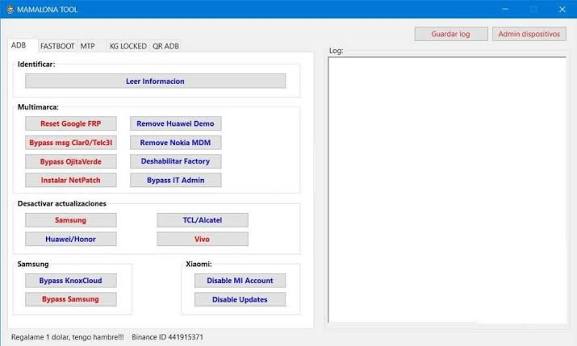
Understanding KG Lock:
KG generally refers to Samsung Knox Guard. It is designed to help protect supported devices against unauthorized use and can be used in scenarios such as financed devices, corporate deployments, and managed smartphones.
A KG-locked device should not automatically be treated as a normal software-lock problem. The lock may indicate an account, payment, organizational, or ownership-related condition that needs to be resolved through an authorized channel.
Mamalona Tool and Samsung Devices:
Samsung devices are commonly associated with Knox-related management systems, but not every Samsung model uses the same security configuration.
Before servicing a Samsung phone, technicians should check:
- Exact model number
- Android version
- Security patch level
- Knox status
- KG state
- Firmware/build information
- Device ownership or service authorization
These details can significantly affect what operations are available.
ADB and Fastboot Requirements:
ADB and Fastboot operations require appropriate communication between the Android device and Windows computer. Depending on the device, this can involve USB drivers, debugging authorization, bootloader availability, and supported connection modes.
A reliable USB cable and stable USB connection are also recommended during normal servicing.
Benefits for Technicians:
Mamalona Tool can be useful because it places common Android communication functions into one Windows-based interface.
Potential advantages include:
- ADB device communication
- Fastboot support
- Device information
- Reboot management
- Android software diagnostics
- Samsung-focused servicing workflows
- Convenient graphical interface
- Support for advanced Android users and technicians
Common Troubleshooting:
Device Not Detected
If the phone is not detected, check the USB cable, Windows drivers, USB port, and connection mode. For ADB, ensure that debugging authorization is available where required.
Fastboot Connection Problem
Confirm that the device supports Fastboot and is correctly placed into the required mode. Installing the appropriate Android USB drivers can also improve detection.
KG State Remains Active
A KG state is controlled by Samsung’s security and management infrastructure. A generic ADB or Fastboot operation should not be expected to legitimately remove an active ownership or management restriction. The appropriate resolution depends on why the device is locked.
Tool Feature Does Not Work
Compatibility can vary by Samsung model, Android version, security patch, bootloader state, and KG configuration. Always verify that the selected function supports the specific device.
Safety and Responsible Use:
Mamalona Tool should only be used on devices that you own or have explicit authorization to service. KG and Knox protections are designed to protect devices against unauthorized use, so bypassing such protections without authorization can create legal and security issues.
Before performing software maintenance, back up important information whenever possible and verify the device model and firmware. Avoid making system-level changes without understanding their potential effect on the phone.
Final Words:
Mamalona Tool is an Android servicing utility associated with ADB, Fastboot, device information, reboot management, and Samsung-related troubleshooting workflows. It is particularly discussed in connection with KG-locked devices, but KG is a security and device-management mechanism that should be resolved through legitimate ownership or administrative channels.
For technicians, the tool can provide a convenient interface for supported Android maintenance tasks. Always verify compatibility and authorization before working on a protected Samsung device.