Unlock Metro Tool Download For All Motorola Devices Updated 2026
Unlock Metro Tool Download For All Motorola Devices
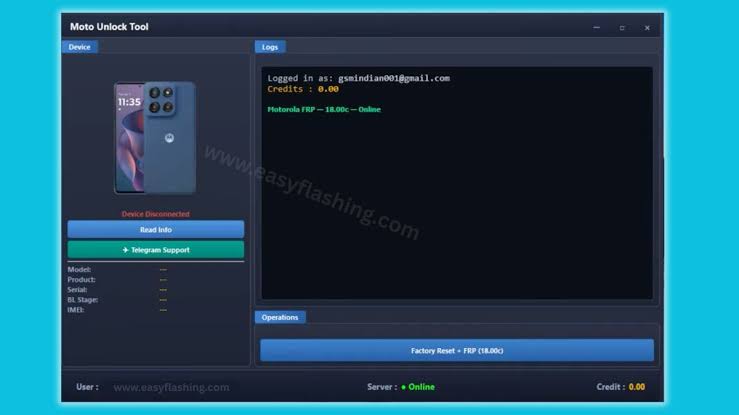
Unlock Metro Tool is a Motorola-focused utility associated with servicing Metro by T-Mobile devices and providing functions related to network-unlock support, connectivity, device management, and basic maintenance. Public descriptions of the tool mention support for a range of Motorola devices along with features such as hotspot management, reboot options, settings access, and Metro-related servicing functions.
What Is Unlock Metro Tool?
Unlock Metro Tool is designed for technicians and advanced Android users working with Motorola smartphones originally associated with Metro by T-Mobile. The utility brings several device-management functions together in one interface, making it useful for troubleshooting connectivity and servicing supported Motorola models.
Network unlocking should always be performed through legitimate and authorized methods. Carrier eligibility requirements, device status, and model-specific restrictions can determine whether an unlock is available.
Key Features of Unlock Metro Tool:
Motorola Device Support
- The Tool is primarily associated with Motorola smartphones sold through Metro by T-Mobile. Public descriptions advertise broad Motorola support, although actual compatibility can depend on the specific model, firmware, security patch, and carrier configuration.
Network Unlock Support
- One of the main purposes associated with the tool is network-unlock servicing for supported Metro devices. An unlocked device may be able to operate with another compatible carrier when it meets the carrier’s eligibility requirements.
- Users should confirm that the phone is legitimately eligible for unlocking before attempting any servicing operation.
Hotspot and Internet Sharing
- Unlock Metro Tool is also described with hotspot and internet-sharing functions. These options can help users manage supported device connectivity and troubleshoot mobile-data sharing features.
Device Reboot
- A built-in reboot function can make routine servicing more convenient by allowing technicians to restart a supported phone from the computer-based interface.
Settings Access
- The utility provides quick access to certain Android settings, which can be useful when diagnosing connectivity or configuration problems on supported devices.
Metro-Related Application Management
- Public descriptions also mention management of the Metro unlock application and related device components. These functions are intended for troubleshooting and authorized device maintenance.
Motorola Compatibility:
Unlock Metro Tool is advertised for Motorola devices, but the phrase “all Motorola devices” should not be interpreted as guaranteed compatibility with every Motorola model. Android versions, chipset generations, carrier variants, firmware builds, and security updates can all affect functionality.
For example, third-party servicing communities have reported different levels of support across Motorola G, Edge, and Razr models, showing why model-specific compatibility checks are important.
Why Technicians Use Motorola Service Tools?
Carrier-branded Motorola phones can contain customized software and carrier-specific configurations. A specialized servicing utility can make it easier to identify the device, manage supported settings, troubleshoot connectivity, and perform legitimate maintenance.
For repair shops, having a dedicated Motorola-focused tool can also reduce the need to switch between several utilities during routine diagnostic work.
Windows Setup:
A Windows computer with the correct Motorola USB drivers is generally important for reliable communication between a computer and Android smartphone. A quality USB cable and stable USB connection are also recommended.
Before starting any service operation, technicians should check the phone’s exact model number, Android version, firmware information, carrier configuration, and current device condition.
Common Troubleshooting:
Motorola Phone Is Not Detected
- If the tool cannot recognize a phone, check the USB cable, USB port, device drivers, and connection mode. Restarting the phone and Windows computer can also resolve temporary communication problems.
Unlock Function Is Unavailable
- A network-unlock function may not work if the device does not meet the carrier’s eligibility requirements or if the specific firmware/model is unsupported. Carrier restrictions should be verified before attempting additional troubleshooting.
Hotspot Feature Does Not Work
- Hotspot availability can depend on the carrier plan, device configuration, firmware, and network settings. Resetting supported network settings or checking the carrier configuration may help diagnose the issue.
Compatibility Problems
- If a feature works on one Motorola model but not another, the difference may be related to firmware, chipset, Android version, or carrier-specific software. Always verify model compatibility before performing advanced maintenance.
Safety and Responsible Use:
Network unlocking is different from bypassing device security. Users should only service phones they own or have explicit authorization to repair. A carrier lock should be removed through legitimate eligibility and supported procedures.
Before making system-level changes, back up important information whenever possible. Avoid interrupting active servicing operations, and use the correct drivers and software for the specific Motorola model.
Final Words:
Unlock Metro Tool is a Motorola-oriented servicing utility associated with Metro by T-Mobile devices. Its advertised functionality includes network-unlock support, hotspot and internet-sharing management, reboot options, settings access, and other device-maintenance features.
Although the tool is often promoted as supporting a broad range of Motorola devices, compatibility can vary depending on the exact model, firmware, Android version, carrier configuration, and security level. For the best results, technicians should verify compatibility and use network-unlock functionality only on legitimately owned or authorized devices.