TFT MTP Bypass Tool V5.0.0 Free Download (Latest Version)
TFT MTP Bypass Tool V5.0.0
A Samsung phone might power on and reach the lock screen, yet remain unusable due to a requirement for Google or Samsung account verification. Software-based locks prevent the device from being used; however, resorting to a BROM/EUD-level (low-level chipset programming) solution is neither necessary nor justified.
A better alternative is the “TFT MTP Bypass Tool.” Unlike other methods that require “flashing” the device or accessing it at a low level, this tool utilizes Samsung’s Download Mode (Odin) and a COM port to communicate with the phone. Consequently, it avoids the need for risky, chipset-level access. The “TFT MTP Bypass Tool” can also perform similar functions on Huawei devices.
This manual explains all the tool’s features and includes the necessary drivers. Its usage is demonstrated through a practical example, and troubleshooting tips are also provided. The manual concludes with a Frequently Asked Questions (FAQ) section. Finally, a dedicated section addresses the legal and authorized use of the tool.
Quick Facts At A Glance
| Detail | Specification |
|---|---|
| Tool Name | TFT MTP Bypass Tool |
| Platform | Windows PC |
| Primary Brand Focus | Samsung, with added Huawei functions |
| Connection Modes | COM (Normal Mode), Odin (Download Mode), MTP/Functions tab |
| License | Free To Download From The Official Page And Use Directly No Separate Activation Required |
| Driver | Samsung USB driver (COM and Download Mode) |
What is MTP TFT Bypass tool and who needs it?
The concept behind the TFT MTP Bypass is that bypassing FRP (Factory Reset Protection) and handling other screen lock-related tasks on Samsung devices typically does not require a full connection at the chipset level. The MTP TFT Bypass allows users to bypass FRP blocks and perform other operations, such as factory resets and baseband repairs, without the need to use the BROM or EDL modes. This is possible as long as the Samsung device is in standard COM mode or download mode. Therefore, compared to the BROM and EDL methods, this alternative is simpler and carries less risk when dealing with FRP locks.
This tool is useful for technicians who specialize in repairing Samsung devices, especially those who often encounter Samsung units with FRP locks, as well as Huawei devices with account locks. However, this tool is not meant to replace a comprehensive, multi-brand repair and flashing solution, which is far more versatile in the long run. Its purpose is to provide a quick and easy way to address common repair scenarios, such as FRP locks.
Hardware Requirements, Drivers, and Configuration:
Before using the TFT MTP Bypass tool, familiarize yourself with the entire process. You will need a Windows-based computer, a high-quality USB cable, and the appropriate USB drivers for Samsung devices. Install these drivers so that Windows recognizes the phone as a Samsung device rather than a generic Android device. These drivers will also enable the use of COM and “Download” modes. If prompted, run the tool as an administrator.
Some users have reported that antivirus software may flag this tool as a threat. Ensure that you have downloaded it from a reliable source. If you choose to use it, add an exception for the tool in your antivirus software settings. Fully charge the phone and back up any data that the client wishes to keep; using this tool will trigger a factory reset, which will permanently erase all data from the device.
Proper Installation of Samsung USB Drivers:
It is crucial to install the Samsung drivers before connecting the phone. If you connect the device before the installation is complete, the process will likely fail. A COM port is detected in “normal mode” when the phone is powered on and connected to the computer. To enter “Download mode,” turn off the phone and use the following button combination: Volume Down + Volume Up + Volume Up. If a driver installation fails, a COM port marked with a yellow question mark will typically appear in Device Manager. Reinstalling the driver usually resolves this issue.
Features of the TFT MTP Bypass tool:
COM [Normal Mode]
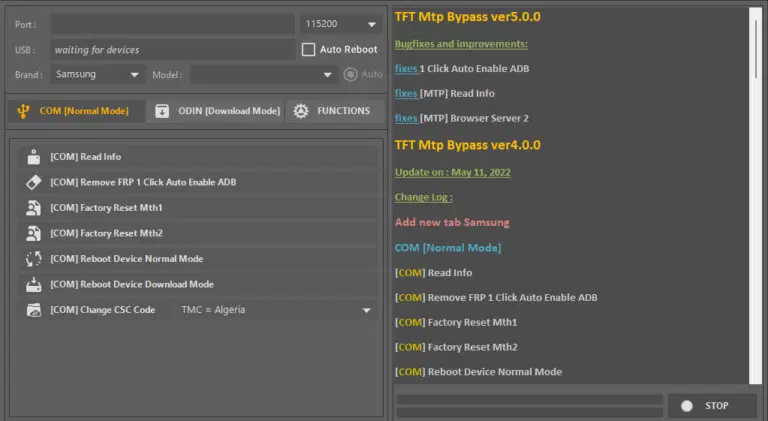
COM mode functions when the phone is powered on and connected in the standard manner. This is the least intrusive way to interact with the device. The “Read Info” option allows you to retrieve the model number, software version, and security patch date (month/year). This information can be useful before making any further changes. To remove an FRP (Factory Reset Protection) lock in COM mode, USB debugging (ADB) must be enabled. The “Remove FRP 1 Click” feature automates the process of enabling ADB and removing the FRP lock, requiring significantly less user intervention than a manual procedure.
If a factory reset is required, COM mode offers two methods (“Mth1” and “Mth2”) to perform this operation. Since the factory reset process can vary depending on the Samsung phone model, having two methods increases the chances of success. It is also possible to reset the phone while it is in normal mode or Download mode (by booting the device into the appropriate mode). Changing the CSC code allows for the modification of the phone’s configuration, which is tied to a specific country or carrier. Unlike other functions, the basic diagnostic test (DBT) has limited utility and is primarily intended for diagnostic purposes. If the standard procedure does not yield results, it is worth trying the DBT test.
Odin [Get Mode]:
The “Tft Mtp Bypass” tool uses Odin mode—a state in Samsung’s firmware—which extends its functionality beyond COM mode. The “Read Info” command displays the status of the connection, similar to COM mode. The “Delete FRP MTH1” and “MTH2” options allow removal of the FRP (Factory Reset Protection); however, due to differences in Samsung security patches, a method that successfully removes FRP in one version of a specific firmware may not work properly in another version.
The “Delete Knox” function clears the Knox security flag. While software-based removal of Knox may create the impression that a device is properly configured or ready for resale, at the hardware level, the device may still appear to be “hit” (with its security flag changed) or blocked by Knox. Software-based solutions can address general firmware issues. “Baseband Repair” and typing “ENG EFS” resolves network-related problems, as well as fixing the IMEI and ESN. In addition, the “Remove please call me” option removes the “Please call me” notification.
Step-by-step Connection And Bypass Workflow:
Go Through This Process For Each Task Assigned To You.
- Samsung Usb Drivers Must Be Installed To Communicate With The Phone.
- If The Phone Is Powered On And The Customer Wants The Data Backed Up Backup The Data.
- Open The Tft Mtp Bypass Tool As An Administrator.
- Once Com Mode Is Activated The Phone Can Be Connected Normally. Download Mode Is Activated By Bootloaders.
- The Port Must Be Shown In The Device Manager With A Green Tick.
- Read Info Must Be Run Prior To Using Any Of The Other Tabs.
- In Com Mode Attempt Frp Removal First. If That Is Unsuccessful Boot Into Odin Mode.
- Stay Connected To The Phone And Powered On Until The Logged Process Is Completed.
- Allow The Phone To Restart On Its Own.
A Frp Screen Should Not Be Confused With A Fully Functioning Phone. Basic Tests Should Be Performed To Verify The Phone Is Functioning Properly. Basic Tests Include Placement Of A Call And Connection To Wi-fi.
Common Errors And Real Troubleshooting:
Problem Likely Cause Fix
- Phone Not Detected In Com Mode Driver Issue Or Phone Not Completely Booted Restart The Samsung Driver Ensure The Phone Is At The Lock Or Home Screen
- Connection Failure In Odin Mode Cable Or Key Combination Issue Access Download Mode Test Other Usb Ports And Use A Different Cable
- Frp Removal Fail Security Patch Not Used Use The Correct Patch For Android And Use Mth1 And Mth2 Successively
- Frp Bypass Fail Firmware Too Recent Use Com Mode Or Odin Mode Frp Bypass
- Imei Or Signal Loss After Repair Baseband Repair Without Efs Restore From Backup If Available Else Use Write Eng Efs
- Knox Trip Unnecessary Knox Erase Do Not Erase Knox If Not Required
At Times Users Select The Wrong Mode To Interact With The Tool And Get Frustrated When The Phone Doesn’t Respond As Expected. Confirm Phone Status And Determine If It Is In Download Mode Before Taking Any Conclusive Opinions On The Tool.
Safety instructions and measures to prevent permanent device damage (so-called “bricking”):
Operations in Odin mode are more critical than those in COM mode; therefore, never interrupt the connection between the device and the computer while an action is in progress in Odin mode. Even a seemingly simple task, such as “Read Info,” must always be allowed to complete fully.
Triggering the Knox flag (often referred to as “tripping Knox”) should be done only in extreme cases. Once this flag has been tripped, it cannot be reset to its original state, not even by updating the software.
Always create a backup of the original EFS partition before performing a “Baseband Repair” or writing an engineering EFS partition (“Write Eng EFS”). These operations can invalidate the IMEI number or disrupt the device’s ability to connect to mobile networks. Such changes are generally irreversible.
Using a USB hub increases the risk of a timeout or a connection interruption while in Odin mode. You can reduce the risk of these issues by ensuring the computer is connected to a power source (especially when using a laptop). Do not use power-saving modes, and ensure that the computer does not enter sleep mode.
Final notes:
It is possible to bypass Samsung accounts, Factory Reset Protection (FRP), and other types of security locks. While these procedures can be useful for legitimate repairs—provided, of course, that you have the client’s consent—they can also be misused for unlawful purposes. Use the “TFT MTP Bypass” tool only on devices for which ownership can be properly verified, for example, by presenting a proof of purchase. Using this tool on a device of unknown origin could damage your relationship with the client and expose your business to legal risks.
Maintain a simple record of all unlocks and FRP (Factory Reset Protection) bypasses you perform. Log the device’s IMEI number, the customer’s name, and the specific function used. Keeping such a record does not take much time, yet it could help prove your innocence should you ever be accused of unauthorized tampering with a device’s history. Given the nature of your work and the volume of Samsung device repairs you handle, this tool could prove to be a helpful resource. It is free to download and use, so there is no cost involved in giving it a try.
TFT MTP Bypass Tool: