MFA Tool Beta V0.1.0 Latest Version Free Download Latest Setup 2026
MFA Tool Beta V0.1.0 Latest Version Free Download
MFA Tool Beta V0.1.0 is an Android servicing utility designed for technicians who work with supported Samsung and other Android devices. The tool focuses on software customization, language-related operations, device management, and several connectivity and servicing functions. Public descriptions of the Beta 0.1.0 release mention support for Samsung devices from Android 6 through Android 14, along with selected LG models and Android devices using MTK and SPD platforms.
What Is MFA Tool Beta V0.1.0?
MFA Tool Beta V0.1.0 is a Windows-oriented mobile servicing tool intended to bring multiple Android maintenance functions into one interface. Its reported features include language customization, selected CSC operations, application management, device information, screen-related functions, and connectivity options.
The Beta release is particularly aimed at technicians and advanced Android users who need a convenient utility for working with supported devices during software maintenance and customization tasks.
Key Features of MFA Tool Beta V0.1.0:
Samsung Language Customization
- One of the main advertised features is language customization for supported Samsung devices. The Beta release is reported to support Samsung devices running Android 6 through Android 14 for certain language-related operations.
- This can be useful for technicians preparing devices for different regional markets or assisting users who need additional language options.
Android Language Support
- The tool also provides functions related to Android language configuration through supported methods and applications. This gives technicians another way to manage language settings on compatible devices.
CSC Functions
- MFA Tool includes reported CSC-related functionality for supported Samsung devices. CSC settings can affect regional configuration, carrier-related settings, and other software characteristics.
- Because CSC operations can vary between models and firmware versions, users should verify compatibility before making changes.
IMS and VoLTE-Related Functions
- The Beta 0.1.0 release is also described as offering IMS-related functions for selected Samsung, MTK, and SPD devices. These functions may be useful when diagnosing or configuring supported network-related features such as VoLTE.
Application Management
- Another useful section is application management. According to public descriptions, the tool can provide options for viewing, disabling, installing, uninstalling, and backing up applications on supported devices.
- This can help technicians organize applications during device maintenance and troubleshooting.
Device Information
- Device information features can assist with identifying the connected phone before starting a servicing task. Checking the model, platform, and connection status is an important part of any professional repair workflow.
Connectivity Functions
- The tool is also described with connectivity-related options, including Wi-Fi and other device communication functions. Availability can depend on the connected device and Android version.
Screen and Device Management
- MFA Tool includes functions related to viewing or interacting with the connected device screen. Such capabilities can be useful during diagnostics and software maintenance when supported by the device.
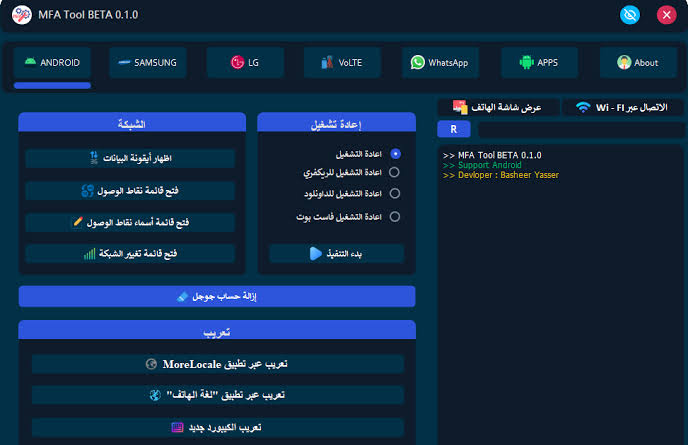
Supported Devices:
Public information about MFA Tool Beta V0.1.0 lists Samsung devices across Android 6 through Android 14 for certain features. It also mentions selected LG models, including L713, L413, and L212, as well as Android devices using MTK and SPD platforms.
However, support should not be considered universal. Different models, firmware versions, security patches, and chipset configurations can affect whether a specific feature works correctly.
MFA Tool for Samsung Devices:
Samsung users may find MFA Tool useful for supported language, CSC, application, connectivity, and software-maintenance tasks. The tool can be particularly convenient when several maintenance functions are needed from the same interface.
Before working on a Samsung phone, technicians should confirm the exact model number, Android version, firmware information, and supported operation.
MFA Tool for MTK and SPD Devices:
The Beta release is also associated with selected MediaTek (MTK) and Spreadtrum/Unisoc (SPD) devices. These platforms have different communication and servicing requirements, so proper drivers and compatible connection modes are important.
Users should always confirm chipset compatibility instead of assuming that every MTK or SPD device is supported.
Windows Setup and Requirements:
MFA Tool is intended for use in a Windows-based servicing environment. A reliable USB connection and correctly installed device drivers are important for communication between the computer and smartphone.
Before using the tool, it is recommended to:
- Use a stable Windows computer.
- Install the appropriate device drivers.
- Use a good-quality USB cable.
- Charge the phone sufficiently.
- Close unnecessary phone-management programs.
- Confirm the exact device model and chipset.
- Keep important user data backed up.
Troubleshooting MFA Tool:
Device Not Detected
- If the phone is not detected, check the USB cable, USB port, drivers, and connection mode. Reconnecting the device or restarting Windows may resolve temporary communication problems.
Feature Not Working
- Not every function works on every Android model. If a feature fails, check whether the device model, Android version, chipset, and firmware are compatible with the Beta release.
Driver Issues
- Incorrect drivers can prevent communication between MFA Tool and the phone. Installing the appropriate driver package and reconnecting the device can help resolve detection problems.
Software Instability
- Because V0.1.0 is identified as a Beta release, users may encounter compatibility limitations or unexpected behavior. It is best to use Beta software carefully, especially when performing important device-maintenance operations.
Safety and Responsible Use:
MFA Tool should only be used on devices that you own or are authorized to service. Security-related Android protections are designed to prevent unauthorized access, so any account or security-related servicing should be performed only with legitimate authorization.
Always verify firmware and device compatibility before making system-level changes. Incorrect operations can cause boot problems, data loss, or other software issues.
Final Words:
MFA Tool Beta V0.1.0 is a multi-purpose Android servicing utility with a focus on Samsung and selected Android devices. Its advertised capabilities include language customization, CSC-related functions, IMS/VoLTE-related servicing, application management, connectivity features, and device maintenance. Public information also lists support for Samsung Android 6–14 devices, selected LG models, and certain MTK and SPD devices.
As a Beta release, compatibility may vary between devices and firmware versions. Technicians should verify device support, install the correct drivers, and use the software carefully when performing servicing operations.