Sm Tool Qualcomm Edition Free Download Latest Version 2026
SM Tool Qualcomm Edition Free Download Latest Version
SM Tool Qualcomm Edition is a Windows-based mobile servicing utility designed primarily for Android smartphones and devices powered by Qualcomm chipsets. It is aimed at technicians and advanced users who need a centralized solution for device diagnostics, firmware-related maintenance, software troubleshooting, and supported servicing operations. Information available online describes the tool as supporting Qualcomm-based Samsung devices as well as a range of other Snapdragon-powered phones, although exact compatibility can vary between versions and device security levels.
What Is SM Tool Qualcomm Edition?
SM Tool Qualcomm Edition is a specialized Qualcomm servicing tool that communicates with compatible Android devices through supported connection modes. It can be useful for identifying device information, performing software maintenance, working with firmware, and troubleshooting devices that are experiencing software-related problems.
Qualcomm-based phones often require specialized servicing utilities because their communication and recovery modes differ from those used by other chipsets. SM Tool Qualcomm Edition is designed around this Qualcomm ecosystem, making it potentially useful for mobile repair professionals working with supported Snapdragon devices.
Key Features of SM Tool Qualcomm Edition:
Qualcomm Device Support
- The main purpose of this edition is Qualcomm-based device servicing. Depending on the release and device model, the software may support smartphones from manufacturers such as Samsung and other Android brands using Qualcomm platforms.
- Because support can depend on the exact model, chipset, firmware build, and security patch, users should always verify compatibility before attempting any service operation.
Device Information
- SM Tool Qualcomm Edition can be useful for reading available device information during servicing. Identifying the model and connection state before performing maintenance helps technicians select the appropriate repair workflow.
- Device information can also help determine whether a particular Qualcomm device is compatible with the installed version of the tool.
Firmware Maintenance
- Firmware-related functionality is one of the important areas of Qualcomm servicing tools. SM Tool Qualcomm Edition is associated with firmware flashing and software maintenance capabilities for supported devices.
- Firmware operations can be useful when a phone has software corruption, boot problems, failed updates, or other operating-system-related issues. However, firmware must always match the exact device model and hardware configuration.
EDL-Based Servicing
- Qualcomm devices can use Emergency Download Mode, commonly known as EDL, for specialized low-level servicing. SM Tool Qualcomm Edition has been associated with EDL-related operations for supported Qualcomm devices.
- EDL is an advanced service environment, so it should be used carefully. Incorrect firmware, incompatible partitions, or interrupted operations can potentially leave a device unable to boot.
Software Repair
- The tool can be useful for technicians dealing with common Android software problems. Depending on device support, servicing workflows may include software recovery, factory-reset-related maintenance, firmware restoration, and other diagnostic tasks.
- These functions make Qualcomm-focused tools valuable in professional repair environments where standard Android settings are not sufficient to resolve a problem.
Bootloader and Security-Related Servicing
- Online descriptions of SM Tool Qualcomm Edition mention bootloader and security-related functions. Such features can be useful in legitimate device servicing when the technician has authorization from the device owner.
- Security mechanisms such as Factory Reset Protection are designed to protect lost or stolen devices. Therefore, any security-related servicing should only be performed on devices that the user owns or is explicitly authorized to repair.
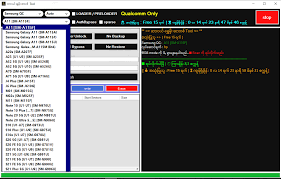
Supported Devices:
SM Tool Qualcomm Edition has been reported with support for various Samsung Qualcomm models, including selected Galaxy A, M, Note, S, Z Flip, and Z Fold devices. The available model lists include examples such as Galaxy A01, A02s, A20s, A23, A52 5G, A71 5G, Note 10 series, Note 20 series, S10 series, S20 series, S21 series, S22 series, S23 series, and selected foldable models.
However, a model appearing on an older compatibility list does not guarantee that every firmware version or security patch is supported. Qualcomm servicing compatibility can change significantly between releases.
SM Tool Qualcomm Edition for Samsung Devices:
Samsung has released many devices with different Qualcomm and Exynos configurations. The Qualcomm edition is particularly relevant to Samsung models that use Snapdragon platforms.
Before starting any maintenance operation, technicians should confirm:
- Exact Samsung model number
- Qualcomm chipset compatibility
- Firmware/build information
- Bootloader or binary revision
- Android version
- Security patch level
- Supported connection mode
- Correct USB drivers
Checking these details can prevent many compatibility problems.
SM Tool Qualcomm Edition for Windows:
SM Tool Qualcomm Edition is intended for use on Windows computers. A properly configured Windows environment is important because Qualcomm servicing applications depend on USB communication and device drivers.
For best results, users should keep their Windows installation updated, install appropriate device drivers, use a reliable USB cable, and avoid running multiple conflicting phone-service applications at the same time.
How SM Tool Qualcomm Edition Can Help Technicians?
A Qualcomm servicing tool can save time by bringing several maintenance functions into a single interface. Instead of switching between different utilities for device information, firmware operations, diagnostics, and connection management, technicians can use a dedicated Qualcomm-focused environment.
This can be especially helpful for repair shops that regularly work with Snapdragon-powered Android smartphones.
Important Precautions:
- SM Tool Qualcomm Edition should be used responsibly. Before performing any major software operation, create a backup whenever possible and verify the exact device model and firmware information.
- Do not disconnect the device during firmware-related operations unless the software specifically instructs you to do so. An interrupted process can cause additional software problems.
- Security-related features should only be used on devices that you own or have explicit authorization to service. FRP and similar protections exist to prevent unauthorized access to devices.
Common Problems and Troubleshooting:
Tool Does Not Detect the Phone
- If the software cannot detect a device, check the USB cable, USB port, Windows drivers, and device connection mode. Restarting the computer and reconnecting the phone can also resolve temporary communication problems.
Qualcomm Driver Problems
- Incorrect or missing Qualcomm drivers can prevent proper communication between Windows and the smartphone. Installing the appropriate official or trusted driver package for the device platform can help resolve detection issues.
Firmware Compatibility Error
- A firmware package must correspond to the correct device variant. Regional variants, hardware revisions, bootloader versions, and security levels can affect compatibility.
Device Disconnects During Service
- Unexpected disconnections can result from faulty USB cables, unstable USB ports, insufficient power, driver problems, or device hardware issues. Using a quality cable and a stable USB connection is recommended.
Benefits of SM Tool Qualcomm Edition:
Some of the main advantages of a Qualcomm-focused service utility include:
- Qualcomm-oriented device support
- Firmware maintenance capabilities
- Device information and diagnostics
- Support for specialized Qualcomm connection modes
- Useful functions for professional mobile technicians
- Centralized servicing interface
- Compatibility with selected Samsung Qualcomm models
- Assistance with software-related troubleshooting
Things to Check Before Downloading:
Before downloading any SM Tool Qualcomm Edition package, users should verify the source and make sure the software has not been modified. Unofficial repair-tool packages can sometimes contain unwanted programs or malware.
It is also important to check the tool version, supported devices, Windows requirements, and any licensing or activation requirements before installation.
Final Words:
SM Tool Qualcomm Edition is a Qualcomm-focused Android servicing utility intended for technicians and advanced users working with compatible Snapdragon-powered devices. Its reported capabilities cover areas such as device information, firmware maintenance, software troubleshooting, and specialized Qualcomm servicing modes.
Because mobile security and firmware compatibility change frequently, users should always verify the exact model, chipset, firmware version, and supported security level before performing any repair operation. When used on authorized devices and with the correct firmware, a specialized Qualcomm servicing tool can be a useful addition to a professional Android repair toolkit.