Chigo MTK Preloader Tool Download Unlock Frp & Flash Latest Version 2026
Chigo MTK Preloader Tool Download – MediaTek Flashing, FRP Servicing and Phone Repair
Introduction to Chigo MTK Preloader Tool
Chigo MTK Preloader Tool Download is a Windows-based mobile servicing utility designed for selected smartphones powered by MediaTek (MTK) processors. It is intended for mobile repair technicians who need to diagnose software problems, manage compatible firmware, back up selected device information, and perform supported maintenance operations.
The tool is associated with features such as firmware flashing, partition management, device information reading, backup functions, and selected FRP-related servicing. Its preloader-focused workflow is intended to communicate with compatible MediaTek devices through supported USB connection modes.
Chigo MTK Preloader Tool Download has been shared through mobile servicing websites and community channels. Since different releases may contain different features and compatibility lists, users should confirm the exact version and verify the download source before installing the software.
What Is Chigo MTK Preloader Tool?
Chigo MTK Preloader Tool Download is a specialized utility for servicing compatible MediaTek-based Android phones. MediaTek processors are used in devices from manufacturers such as Xiaomi, Redmi, OPPO, Realme, Vivo, Infinix, and Tecno, although support depends on the specific model and implementation.
The tool is advertised for several types of servicing work, including firmware maintenance, device identification, selected partition operations, and repair-related tasks. Some versions also list FRP-related functions and user-lock servicing. These advertised features should not be interpreted as a guarantee that every function works on every phone.
Main Features of Chigo MTK Preloader Tool:
1. Firmware Flashing
- Chigo MTK Preloader Tool Download includes advertised flash operations for compatible MediaTek devices. Firmware flashing can help technicians reinstall suitable software when a phone has certain firmware-related problems.
- Correct firmware selection is essential. Using files intended for a different model or hardware revision can cause boot failures, data loss, or other software problems. Always verify the device model and firmware package before proceeding.
2. Erase and Backup Functions
- Published feature descriptions include erase and backup options for supported devices. These functions can assist with authorized maintenance and selected troubleshooting tasks.
- Erasing data can permanently remove personal information. Back up important files before performing any operation that may affect the phone’s storage.
3. Partition Management
- Chigo MTK Preloader Tool Download is advertised with partition-related capabilities, including viewing or managing supported partitions. Partition management can be useful to experienced technicians investigating firmware or storage issues.
- Incorrect partition changes can prevent a phone from booting properly. Use only compatible files and avoid modifying partitions unless the purpose and consequences of the operation are understood.
4. Device Information and Diagnostics
- Device information functions help identify a connected phone and determine whether it is communicating correctly with the computer. This information can help technicians assess compatibility before selecting a supported repair operation.
- Detection may depend on the installed USB drivers, cable quality, chipset, and device connection mode.
5. MediaTek Preloader Communication
- The tool is designed around servicing workflows for compatible MediaTek devices. Depending on the model and release, it may use preloader or other supported device communication modes to perform maintenance tasks.
- Not all MediaTek devices expose the same interfaces. Newer models may also have security protections or hardware differences that limit compatibility.
6. FRP-Related Servicing
- Some published versions advertise Factory Reset Protection (FRP) servicing. FRP is an Android security feature that helps prevent unauthorized use of a device after a factory reset.
- For a device you own, use the previously synchronized Google account or the official account recovery process to complete verification. Any repair service should be performed only with the owner’s authorization.
7. User-Lock and Software Repair Options
- Third-party feature listings mention user-lock-related servicing and selected repair functions. Availability depends on the release, device model, and software configuration.
- Because such operations can affect personal data and device security, verify the supported workflow and understand whether the operation may erase information before proceeding.
8. USB Driver Compatibility
- A reliable USB connection is necessary for most computer-based mobile servicing. Compatible drivers help Windows identify the connected phone in its supported connection mode.
- If the device is not detected, check the cable, USB port, and driver installation first. Download drivers from reputable sources and avoid installing unknown driver packages.
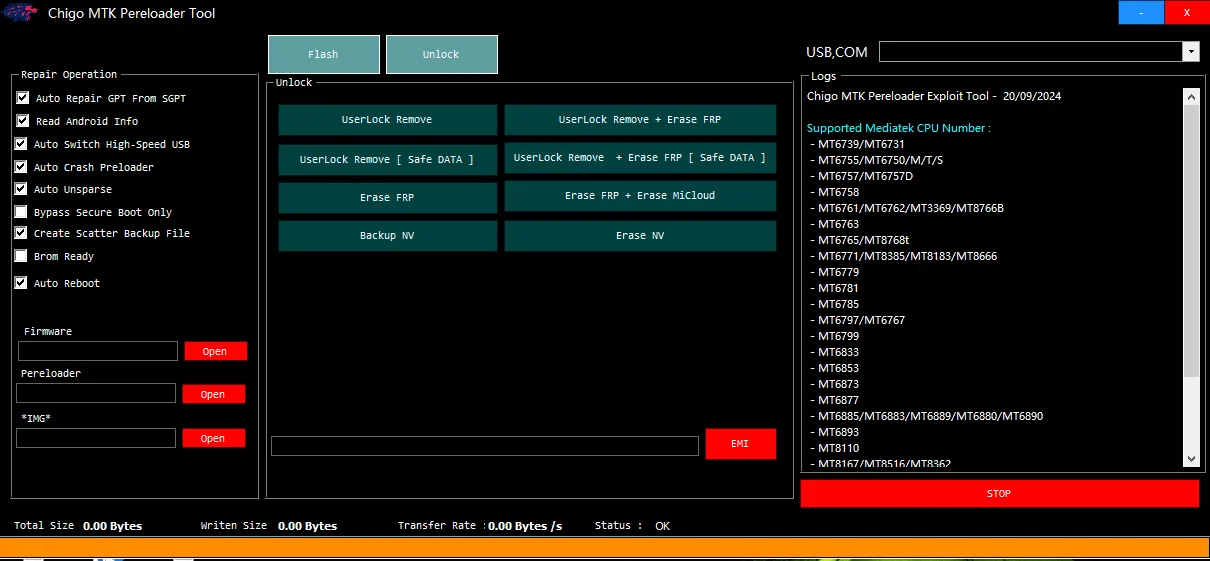
Supported Chipsets and Devices:
Chigo MTK Preloader Tool Download is primarily associated with selected MediaTek chipsets. Older third-party feature lists mention families such as MT6761, MT6765, MT6771, MT6785, MT6833, and other MediaTek platforms.
These listings are not proof of compatibility with every phone using those processors. Firmware format, manufacturer configuration, security patch, and tool version can all affect whether a particular operation is available.
Before using the utility, check the exact model number and chipset against a reliable compatibility list.
System Requirements:
Chigo MTK Preloader Tool is distributed for Windows computers. Confirm the requirements for your particular release before installation.
Recommended preparation includes:
- A compatible Windows computer.
- A reliable USB data cable.
- Appropriate MediaTek USB drivers.
- Correct firmware files for supported maintenance operations.
- Enough free disk space to extract the package.
- A backup of important device data.
Some versions may require activation or other dependencies. Review the distributor’s documentation instead of assuming that every release is free or works entirely offline.
How to Download Chigo MTK Preloader Tool Safely?
Look for the software through a source that clearly identifies the publisher and version. Check the archive name, release information, file details, and supported-device documentation before installing it.
Some third-party listings describe older releases as free, while other versions or related Chigo utilities may have different activation requirements. Verify the terms for the exact package you intend to use.
Scan downloaded files with reputable security software. Avoid modified installers, suspicious key generators, and packages that require you to disable antivirus protection. A download page or video description does not independently confirm that an executable is safe.
Advantages of Chigo MTK Preloader Tool;
The main potential benefit of Chigo MTK Preloader Tool is its collection of servicing options in a single Windows interface. Supported functions may reduce the need to switch between separate utilities for basic device identification, firmware maintenance, and diagnostic work.
Its usefulness nevertheless depends on the specific phone, available firmware, correct drivers, and compatibility of the release. Technicians should verify each function rather than assume that all advertised options will work on every MediaTek device.
Important Safety Notes:
Firmware flashing and partition management can erase data or cause a phone to stop booting if incompatible files are used. Back up important information and verify the device model before starting a repair.
FRP and account-verification protections exist to safeguard device ownership. If you are locked out of your own phone, use official account recovery or an authorized repair provider. Do not use the tool on devices without permission.
IMEI and other network identifiers should only be handled for lawful diagnostic or restoration purposes, using the device’s original identity and following applicable regulations.
Final Words:
Chigo MTK Preloader Tool Download is a Windows mobile servicing utility advertised for MediaTek firmware flashing, backup, partition management, device diagnostics, and selected FRP-related maintenance functions.
Before downloading, verify the release, check device compatibility, and use a trustworthy source. Correct firmware, reliable drivers, and careful preparation are essential for safer repairs. For account verification and other ownership-related restrictions, official recovery and authorized service channels remain the recommended options.