QuickADB Tool V3.0.0 ADB & Fastboot And Flashing Tool Latest Version 2026
QuickADB Tool V3.0.0 ADB, Fastboot and Flashing Tool
QuickADB Tool V3.0.0 is a Windows utility designed to simplify Android device management through Android Debug Bridge (ADB) and Fastboot commands. It provides a graphical interface for common operations such as checking connected devices, rebooting into different modes, transferring files, installing applications, and flashing supported firmware images. The tool is useful for Android developers, mobile technicians, and advanced users who want to manage supported devices without manually entering every command in a terminal. Its advertised features also include wireless ADB, device information, logging, and selected advanced utilities for firmware and application management.
What Is QuickADB Tool V3.0.0?
QuickADB is a graphical utility that brings frequently used ADB and Fastboot operations into one interface. Instead of memorizing commands and entering them manually, users can select supported operations from the program’s available sections.
ADB is commonly used to communicate with an Android device while its operating system is running and debugging access is authorized. Fastboot is used for supported bootloader-level operations, including retrieving device variables and flashing compatible images.
QuickADB also includes advanced features for users who need more than basic device management. These functions may require root access, a compatible bootloader, suitable firmware files, or additional components. Not every feature is available on every Android phone.
Main Features of QuickADB Tool V3.0.0:
1. ADB Device Detection
- QuickADB provides options to check whether a connected Android device is recognized by ADB. This helps users confirm the USB connection and identify whether the phone has authorized the computer.
- If a device is not detected, users may need to check USB debugging, the connection cable, the device’s authorization prompt, and the installed USB drivers.
2. Reboot Options
- The tool provides convenient reboot commands for supported Android devices. Depending on the device and its current state, these can include restarting Android, entering Recovery mode, or switching to the bootloader interface.
- These options are useful during troubleshooting, software development, and routine maintenance. Some modes or commands may not be available on every manufacturer or model.
3. Wireless ADB
- QuickADB V3.0.0 includes wireless ADB functionality, allowing compatible devices to connect to a computer over a network without requiring a continuous USB connection for supported workflows.
- Wireless debugging must be enabled and paired appropriately on the Android device. Use wireless connections only on trusted networks, and disable debugging when it is no longer needed.
4. File Transfer with ADB
- The tool supports file-transfer operations for moving files between a connected Android device and a computer. These functions can be useful for copying logs, transferring documents, and collecting troubleshooting information.
- File access depends on Android permissions and the directories involved. System-protected locations may require additional privileges.
5. Install and Uninstall Applications
- QuickADB provides options for installing APK files and uninstalling supported applications through ADB. This can help developers test applications or technicians manage software on authorized devices.
- Uninstalling system applications can affect normal device operation. Before removing an application, confirm its purpose and avoid deleting components required by Android or the manufacturer.
6. Fastboot Commands
- The Fastboot section provides access to commonly used commands, including reboot options and retrieval of device variables. These details can help users identify the device’s current configuration before performing supported maintenance.
- Command availability varies by manufacturer, bootloader state, and device software. Some commands may require an unlocked bootloader or additional authorization.
7. Firmware Image Flashing
- QuickADB Tool V3.0.0 supports selected Fastboot image-flashing operations. Depending on the device, compatible image files may be used for partitions such as boot, recovery, or other supported firmware components.
- Always verify the exact model, partition name, and firmware build before flashing. An incorrect image can prevent the phone from booting or cause data loss. Follow the manufacturer’s documentation and maintain a backup before modifying firmware.
8. Automatic GSI Flasher
- The advanced feature set includes a GSI flashing utility for supported devices. A Generic System Image (GSI) is a generalized Android system image intended for compatible Project Treble devices.
- GSI installation is an advanced process that may require an unlocked bootloader and suitable partition support. Compatibility is not universal, and installing an unsuitable image can cause startup problems.
9. Super Image and Payload Extraction
- QuickADB Tool V3.0.0 includes utilities for extracting information or individual partitions from supported
super.imgandpayload.binfiles. These formats are used in Android firmware packages, and extracting their contents can help developers and technicians inspect firmware components. - These features are intended for users familiar with Android firmware structure. Extracted images should not be flashed unless they are appropriate for the target device.
10. Application Manager and File Explorer
- The advanced tools include application-management and file-explorer functions. Depending on the device’s permissions, users may be able to review installed apps, inspect application details, manage selected permissions, transfer files, and perform supported file operations.
- Some functions require root access. Changing system files or permissions without understanding their purpose can cause instability or security problems.
11. Magisk and Root-Related Utilities
- QuickADB Tool V3.0.0 advanced features include selected Magisk-related functions, such as boot-image patching and module management. These capabilities are intended for users who understand Android rooting and its security implications.
- Root access can weaken security protections and affect application compatibility. Before making root-related changes, back up the original boot image and confirm that the files match the exact device firmware.
12. Logs and Command Output
- The tool includes a logging interface for reviewing command output and identifying errors. Logs can be useful when diagnosing connection problems or checking whether an operation completed successfully.
- Review the output carefully after a firmware operation. If an error occurs, investigate its cause before rebooting or attempting additional modifications.
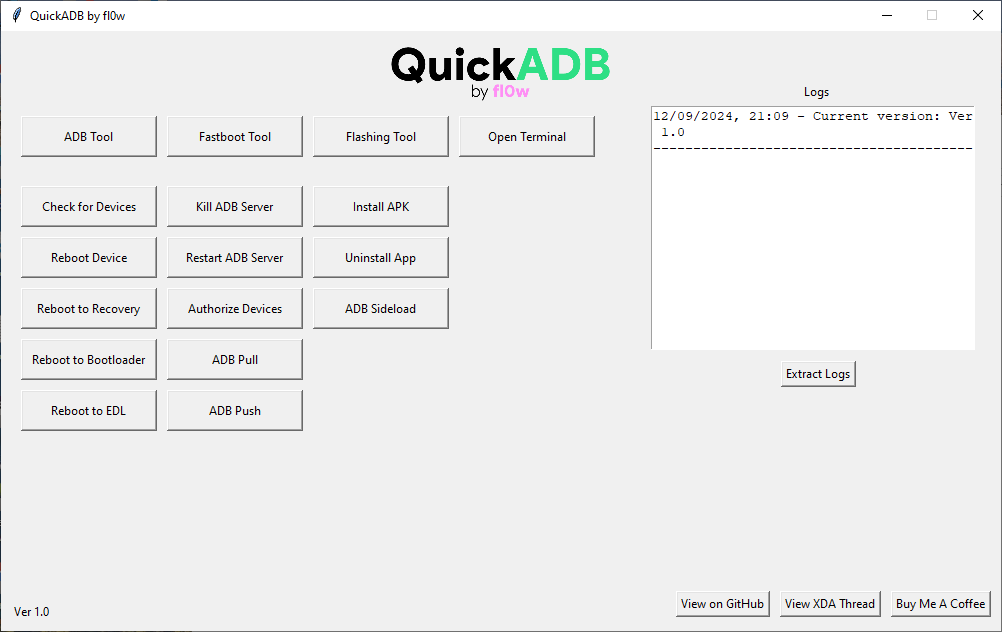
How to Install QuickADB Tool V3.0.0 on Windows?
QuickADB is distributed as a portable application, so a traditional installation wizard may not be required for every release.
- Obtain the software from a trusted source, preferably the original project release page.
- Scan the downloaded archive or executable with reputable security software.
- Extract the package if it is compressed.
- Read the included documentation and check for any additional dependencies.
- Launch the QuickADB executable.
- Connect the Android device through USB and enable USB debugging if required.
- Accept the debugging authorization prompt displayed on the phone.
- Confirm that the device appears in the application before running any commands.
For wireless ADB, follow the pairing procedure supported by the Android version and the utility. Advanced functions may require additional setup or root access.
System Requirements and Compatibility:
QuickADB supports Windows and is also available for Linux and macOS according to the project’s published documentation. The current project lists Windows builds for x86-64 and ARM64 systems, although some advanced features may differ between architectures.
For normal ADB use, USB debugging and device authorization are generally required. Root-dependent functions require a compatible rooted device with appropriate permissions. Fastboot operations depend on the device’s bootloader and manufacturer-specific support.
Benefits of QuickADB Tool V3.0.0:
The main advantage of QuickADB is its centralized interface for ADB and Fastboot tasks. It can reduce the need to type commands manually and makes common operations easier to locate. Wireless ADB, file management, logging, and firmware utilities provide additional convenience for users who work with Android devices regularly.
However, the graphical interface does not remove the risks associated with advanced commands. Firmware flashing, bootloader changes, and root operations should be performed only after checking compatibility and understanding their effects.
Important Safety Recommendations:
Download QuickADB from a trusted source and verify that the package matches your operating system. Back up important data before changing firmware, unlocking a bootloader, or modifying system partitions. Keep a copy of the original firmware files and never interrupt an active flashing process.
Use the tool only on devices you own or are authorized to maintain. For account verification and Factory Reset Protection issues, use official account recovery or authorized service procedures rather than attempting to access a device without permission.
Final Words:
QuickADB Tool V3.0.0 is a versatile Android management utility that combines ADB, Fastboot, wireless debugging, file transfer, application management, and selected firmware tools in a graphical interface. It can be useful for Android developers, technicians, and advanced users who need convenient access to supported device operations. Before using its advanced features, verify the software source, confirm device compatibility, and back up important information to reduce the risk of data loss or software problems.