TTA EDL Tool v1.0.4 Download for MI Account Erase Tool Free Download 2026
TTA EDL Tool v1.0.4 Download for MI Account Erase Tool
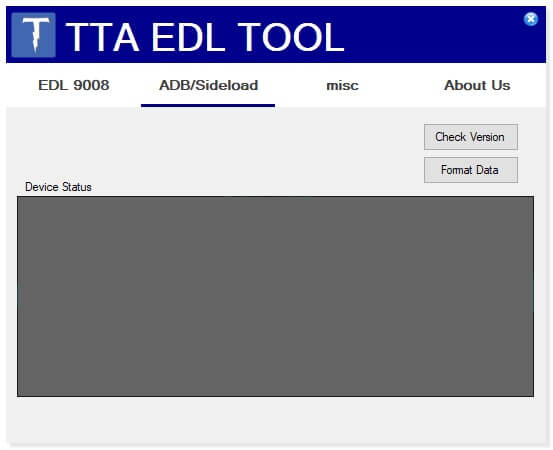
TTA EDL Tool v1.0.4 is a Windows-based mobile servicing utility designed for technicians who work with supported Xiaomi and other compatible Android devices through EDL, or Emergency Download Mode. The tool is associated with device maintenance, firmware servicing, software troubleshooting, and selected account-related repair functions. EDL-based servicing is generally used when a device cannot communicate normally through Android or Fastboot and requires a lower-level service connection.
What Is TTA EDL Tool v1.0.4?
TTA EDL Tool v1.0.4 is intended to provide mobile technicians with a dedicated interface for working with supported devices in EDL mode. Instead of relying entirely on command-line utilities, a graphical service application can organize common operations into a more convenient workflow.
The tool may be useful when servicing compatible Xiaomi devices that have software problems, failed firmware installations, boot-related issues, or other situations where normal Android and Fastboot communication is unavailable.
TTA EDL Tool v1.0.4 Features:
- The main purpose of an EDL utility is to establish communication with compatible devices in Emergency Download Mode. Depending on the supported model and software environment, technicians may use such tools for firmware-related maintenance and device recovery.
EDL Mode Support
- EDL mode is a specialized low-level communication mode used on supported Qualcomm-based devices. It can be useful when a phone cannot boot into Android or Fastboot normally.
- TTA EDL Tool v1.0.4 is designed around this type of servicing workflow, making it relevant to technicians who handle advanced Android software repairs.
Xiaomi Device Servicing
- The tool is primarily relevant to Xiaomi-related servicing workflows. Compatibility depends on the exact device model, chipset, firmware version, security configuration, and authorization requirements.
- Technicians should always verify the supported model before attempting any EDL operation.
Firmware-Related Maintenance
- EDL tools can be used as part of firmware recovery and software maintenance procedures on supported devices. This can be useful when a device has encountered a failed update, corrupted software, boot problems, or an unsuccessful firmware installation.
- Correct firmware selection is essential because incompatible firmware can cause additional software problems.
MI Account-Related Servicing
- The tool is associated with MI Account erase or servicing functions. MI Account and related security mechanisms are designed to protect Xiaomi devices against unauthorized access.
- For legitimate repair work, account-related operations should only be performed when the technician has appropriate authorization from the device owner and when the procedure complies with Xiaomi’s security requirements.
Why Use an EDL Tool?
EDL servicing can be useful when standard Android communication methods are unavailable. A phone that does not boot correctly may still be able to communicate through a supported emergency service mode.
This makes EDL tools valuable in professional repair environments, particularly when technicians are dealing with difficult software failures.
However, EDL is a low-level service interface, so it should be used carefully. An incorrect operation or incompatible firmware package can potentially make a device harder to recover.
Preparing Your Windows Computer:
Before using TTA EDL Tool v1.0.4, technicians should prepare the Windows computer with the appropriate USB drivers. Qualcomm-related device drivers may be required for the computer to recognize a compatible phone in EDL mode.
A stable USB cable and reliable USB port should also be used. Avoid unstable USB hubs during important servicing operations.
It is also recommended to close other phone-management applications that may interfere with the device connection.
Preparing the Xiaomi Device:
Before starting any servicing operation, identify the exact Xiaomi model and hardware configuration. Check the model number, chipset, region, firmware version, and other available information.
If the phone is still accessible, back up important data before performing operations that could modify or erase the device.
Technicians should also confirm that the device is legitimately owned or that they have explicit permission to perform the repair.
How EDL Servicing Works?
In a typical EDL workflow, the technician connects the compatible device to a Windows computer while the phone is placed into its supported Emergency Download Mode.
Windows then detects the device through the appropriate USB interface. The servicing application can communicate with the phone through the EDL connection and provide the functions supported by the device.
The exact process differs significantly between models and chipsets, so users should follow the manufacturer’s or service provider’s instructions for the particular device.
Importance of Correct Drivers:
Drivers are essential for EDL communication. If Windows does not have the correct driver, the tool may not recognize the connected smartphone.
If the device is not detected, technicians should check Windows Device Manager and verify whether the phone appears under the appropriate Qualcomm or emergency download interface.
A different USB port or cable can also be tested if the connection appears unstable.
Firmware Compatibility:
Firmware compatibility is one of the most important considerations when using an EDL servicing utility.
Always verify the exact model and hardware variant before selecting firmware. Xiaomi devices can have different regional and hardware versions, even when their commercial names appear similar.
Using firmware intended for another model can result in failed flashing, boot problems, or loss of important device functionality.
MI Account and Security Considerations:
MI Account protection is a security mechanism intended to protect the device and its associated user data. Account-related servicing should therefore be handled responsibly.
A repair technician should verify ownership before working on account-related functions. If a device is linked to an account that the owner cannot access, the appropriate approach is to use official account-recovery or authorized service procedures whenever available.
TTA EDL Tool should not be used to obtain unauthorized access to someone else’s device or to defeat security protections without permission.
Common Uses in Mobile Repair:
TTA EDL Tool v1.0.4 can be relevant to professional technicians working on supported Android devices for tasks such as:
- EDL device detection
- Firmware-related servicing
- Software recovery
- Boot-related troubleshooting
- Supported Xiaomi maintenance
- Device communication testing
- Authorized account-related servicing
- Advanced Android repair workflows
The exact availability of each function depends on the connected device and its security configuration.
Troubleshooting Device Detection:
If the device is not detected, start by checking the USB cable and Windows drivers. Make sure the phone is actually in the required EDL mode.
Open Device Manager and look for changes when connecting the device. If Windows shows an unknown device or an interface with a driver warning, reinstall or update the appropriate driver.
Using a different USB port can also help. For important operations, a direct motherboard USB connection is generally preferable to an unstable hub.
Troubleshooting EDL Errors:
EDL operations can fail because of unsupported models, incorrect firmware, missing drivers, authorization requirements, unstable USB connections, or security restrictions.
If an error occurs, record the exact message and verify the device model before repeating the operation. Repeatedly attempting an unsupported procedure can create additional complications.
Advantages of TTA EDL Tool v1.0.4:
For technicians, an EDL-focused utility can simplify advanced device servicing by providing a dedicated interface for compatible emergency download connections.
It can also be useful when a device cannot be repaired through normal Android or Fastboot methods. Having an EDL utility available as part of a larger repair toolkit gives technicians another option for supported recovery scenarios.
Safety Precautions:
EDL servicing should be considered an advanced repair procedure. Always maintain a stable USB connection during active operations and avoid interrupting the process unnecessarily.
Use only compatible firmware and ensure that the device model has been correctly identified.
If the device contains important personal information, create a backup whenever possible before performing any operation that may erase or modify data.
Who Should Use TTA EDL Tool V1.0.4?
TTA EDL Tool v1.0.4 is best suited to experienced mobile repair technicians and advanced Android users who understand Qualcomm EDL communication, Windows drivers, firmware packages, and device recovery procedures.
Beginners should learn the fundamentals of Android firmware servicing before working with EDL because low-level operations can cause serious software issues when performed incorrectly.
Final Words:
TTA EDL Tool v1.0.4 is a Windows-based utility aimed at advanced Android servicing through EDL mode, with particular relevance to supported Xiaomi devices and firmware-related repair workflows. Its EDL-oriented design can be useful when normal Android or Fastboot communication is unavailable. Because EDL and MI Account operations involve important device-security and firmware considerations, technicians should verify compatibility, use the correct drivers and firmware, maintain stable connections, and perform account-related servicing only on devices they are authorized to repair.