LU WIFI Tool 2.3 Full iOS 15-18.x Bypass with Notifications 2026 Updated
LU WIFI Tool 2.3 Full iOS 15–18.x Bypass with Notifications
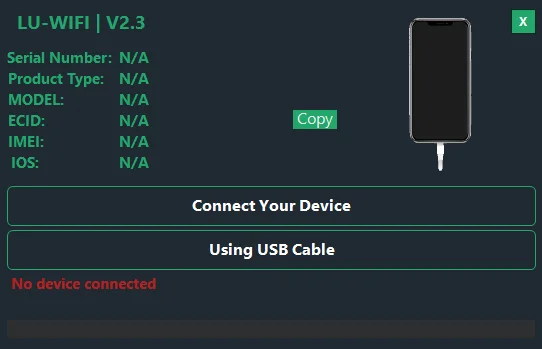
LU WIFI Tool 2.3 is a Windows-based utility advertised for servicing selected iPhones and iPads running supported iOS versions. The software is associated with Palera1n-based jailbreak workflows and is marketed for activation-related troubleshooting, setup-screen issues, and selected Apple service functions. Its published feature list mentions notifications, FaceTime, iMessage, App Store access, reboot options, and language and region settings. However, these features are not guaranteed on every device, and the advertised iOS compatibility should be verified before use. The tool’s listing also identifies an important limitation: cellular service may not be available after certain activation-related operations.
What Is LU WIFI Tool 2.3?
LU WIFI Tool 2.3 is a Windows utility developed for selected Apple devices that encounter activation or setup-related problems. It is promoted as a tool for devices that remain at the Hello screen and require additional servicing.
The software listing describes a one-click interface and support for Intel and AMD processors. It also mentions compatibility with selected older iPhone and iPad models. Actual functionality depends on the device’s hardware, installed iOS version, security configuration, and the specific service being used.
Activation Lock is an Apple security feature designed to prevent unauthorized use of a lost or stolen device. Users who own a locked device should first try Apple’s official account-recovery process or contact Apple Support with valid proof of purchase.
Main Features of LU WIFI Tool 2.3:
1. Activation and Setup Troubleshooting
- The Tool is advertised for handling selected activation and Hello-screen issues on compatible devices. Its interface is intended to simplify certain servicing tasks by bringing supported functions together in one Windows application.
- Results can vary according to the device model, iOS version, and service availability. A successful setup-related operation does not necessarily mean that every original Apple service or hardware function will work normally.
2. Notifications and FaceTime
- Notifications and FaceTime are among the functions highlighted in the tool’s published description. These services depend on device compatibility, activation status, network connectivity, and Apple’s service requirements.
- Users should verify the specific feature support for their device rather than assuming that all notification and communication functions will be restored.
3. iMessage and App Store
- The software listing also mentions iMessage and App Store-related functionality. These services are associated with an Apple Account and Apple’s activation infrastructure, so availability may differ between devices and servicing configurations.
- For normal access, use Apple’s supported activation and account sign-in processes whenever possible.
4. Reboot Options
- LU WIFI Tool 2.3 advertises reboot-related functions for supported devices. Restarting a device can be useful during troubleshooting, especially when a phone or tablet needs to return to its normal startup state after a diagnostic operation.
- Compatibility and behavior may vary according to the model and the device’s current software state.
5. Language and Region Settings
- The published feature list includes language and region adjustments. These settings help users configure supported devices for their preferred language and regional formats.
- Where available, Apple’s built-in Settings application is the safest way to change language and region preferences on a normally activated device.
6. Windows Processor Compatibility
- The tool is advertised for Windows computers with Intel and AMD processors. Its listing names Windows 7, Windows 8, Windows 10, and Windows 11 as supported operating systems.
- These are publisher-listed requirements, not a guarantee that every Windows configuration will work. Driver availability and compatibility with the particular release should be checked before installation.
7. iTunes and Device Connectivity
- The software listing states that iTunes must be installed and recommends the version provided directly by Apple rather than the Microsoft Store edition.
- Apple’s device software and USB drivers can affect whether a Windows computer correctly detects an iPhone or iPad. Always obtain supporting software from a trusted source and confirm that the installed version is appropriate for your computer.
Supported iPhone and iPad Models:
The published LU WIFI Tool 2.3 listing names several older Apple devices, including:
- iPhone 5s, iPhone 6, and iPhone 6 Plus
- iPhone 6s and iPhone 6s Plus
- iPhone SE (first generation)
- iPhone 7 and iPhone 7 Plus
- iPhone 8 and iPhone 8 Plus
- iPhone X
- Selected iPad Air, iPad mini, standard iPad, and iPad Pro models
The listing advertises iOS 15, 16, 17, and 18 support, but compatibility claims should not be interpreted as confirmation that every listed device can use every feature on every release. Verify the exact model and iOS version before relying on the tool.
How to Prepare LU WIFI Tool 2.3 on Windows?
Before running any third-party Apple device utility, take these precautions:
- Obtain the software package from a source you trust.
- Scan downloaded files with reputable security software.
- Review the included documentation and system requirements.
- Install required Apple device software and compatible USB drivers from official sources.
- Use a reliable USB cable and confirm that Windows recognizes the connected device.
- Back up any accessible personal data before performing servicing operations.
Avoid unknown repackaged installers, and do not disable antivirus protection simply because a download page or executable requests it.
Known Limitations:
The tool’s publisher specifically identifies a no-signal limitation for certain Wi-Fi and cellular device configurations. This means that an activation-related operation should not be assumed to restore normal mobile network connectivity.
Other potential limitations include inconsistent support across iOS versions, restricted Apple services, driver problems, and changes introduced by security updates. The advertised functions may also depend on registration or service availability.
Safety and Ownership Considerations:
Activation Lock is intended to protect the owner’s information and prevent unauthorized device use. If you purchased a second-hand iPhone or iPad that remains linked to another person’s account, ask the previous owner to remove it from their account or contact Apple Support with proof of purchase.
Before using third-party servicing software, understand that unsupported changes can lead to data loss, reduced functionality, or additional troubleshooting requirements. Do not use activation-related tools on devices without the owner’s authorization.
Final Words:
LU WIFI Tool 2.3 is a Windows utility advertised for selected iPhone and iPad activation-related servicing, with published features involving notifications, FaceTime, iMessage, App Store access, reboot options, and language settings. Its compatibility claims and limitations should be carefully reviewed before use, particularly when mobile signal or normal Apple service functionality is important. For devices you own, official Apple activation and account-recovery options remain the preferred starting point. Always verify the software source and device compatibility before attempting any third-party operation.