Android Tool By SeharH V1.5 Free Download Latest Version 2026
Android Tool By SeharH V1.5 Free Download
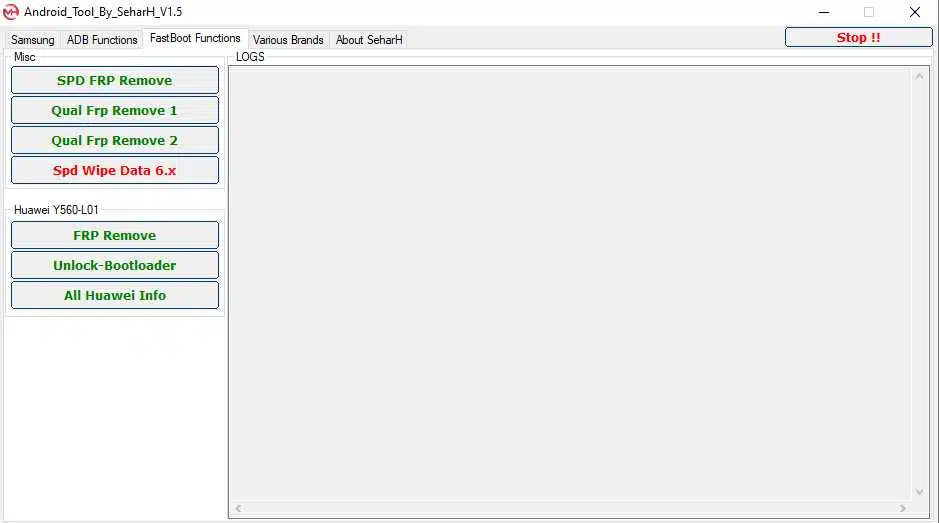
Android Tool By SeharH V1.5 is a Windows-based Android servicing utility designed to help mobile technicians and experienced users perform selected device-management, diagnostic, and software-maintenance tasks. The tool combines ADB and Fastboot functions with options for reading device information, rebooting supported phones into different operating modes, and handling selected chipset-specific servicing operations. It is intended to make common Android maintenance tasks more convenient through a graphical interface rather than requiring users to enter every command manually. The available functions depend on the connected phone, Android version, chipset, drivers, and required authorization.
What Is Android Tool By SeharH V1.5?
Android Tool By SeharH V1.5 is a multi-function utility associated with Android troubleshooting and mobile phone servicing. Its published feature descriptions mention Samsung and Huawei options, general ADB and Fastboot commands, and selected functions for Qualcomm, Spreadtrum, and Allwinner devices. The tool may be useful for technicians who regularly inspect device information, diagnose software issues, or prepare supported phones for authorized maintenance.
The software is commonly described as a Windows utility that does not require a dedicated servicing box for its basic interface. However, this does not mean that every operation works on every device or that additional drivers, permissions, or manufacturer-specific authorization are never required.
Main Features of Android Tool By SeharH V1.5:
1. Read Android Device Information
- The Tool includes options for retrieving available device and build information through supported connection methods. This information can help technicians identify a phone’s software configuration before troubleshooting or selecting a compatible firmware package.
- The information returned depends on the device, its connection state, and the permissions granted to the utility.
2. ADB Functions
- Android Debug Bridge (ADB) allows a computer to communicate with an Android device when debugging is enabled and the computer has been authorized. Android Tool By SeharH includes general ADB-related options for supported maintenance tasks.
- These functions can help users check connectivity, retrieve available information, and carry out selected device-management commands. ADB operations may not work when USB debugging is disabled, the device has not authorized the computer, or security policies restrict access.
3. Fastboot and Reboot Options
- The published feature list includes Fastboot-related operations and options for restarting compatible devices into modes such as Recovery, Bootloader, or EDL where supported. These modes are commonly used during Android development, software recovery, and authorized repair work.
- Fastboot capabilities differ between manufacturers. Some devices restrict particular commands, while others require an unlocked bootloader or additional authorization. Before making changes, verify the phone’s exact model and follow the manufacturer’s servicing instructions.
4. Samsung Device Support
- Android Tool By SeharH V1.5 is advertised with selected Samsung-related ADB and servicing functions. Depending on the model and software version, these may assist with device identification, rebooting, and certain troubleshooting tasks.
- Newer Samsung devices may have security protections that prevent older servicing methods from working. Users should not assume that every Samsung model is supported simply because the brand appears in the feature list.
5. Huawei Device Functions
- The tool’s published descriptions also mention selected Huawei functions, including device-information and bootloader-related options for supported models. Compatibility can vary substantially across generations and firmware releases.
- Before attempting a bootloader or system-level operation, confirm the device’s requirements and make a backup. Incorrect procedures can result in data loss or a device that no longer starts normally.
6. Qualcomm, Spreadtrum, and Allwinner Options
- The software is associated with selected functions for Qualcomm, Spreadtrum (SPD), and Allwinner-based devices. These options are intended for particular servicing situations and may require specific drivers, supported connection modes, and compatible hardware.
- Chipset support alone does not guarantee compatibility with every phone using that processor. The manufacturer’s implementation, security patch, and device configuration can all affect whether a function is available.
7. Diagnostic Mode Options
- Some published descriptions mention a diagnostic-mode option for compatible devices. Diagnostic interfaces can be used by authorized technicians to investigate connectivity, modem, or hardware-related problems.
- Availability varies by chipset and device configuration, and some diagnostic operations require elevated permissions. Use such functions only when needed for legitimate troubleshooting.
8. User-Friendly Interface
- Android Tool By SeharH V1.5 groups supported functions into separate sections, helping users find the relevant servicing option more easily. A centralized interface can reduce the need to switch between multiple command-line windows or utilities.
- Even with a graphical interface, users should understand the purpose of each operation before running it. A single click can initiate a system-level change, and some operations may be irreversible without restoring compatible firmware.
How to Install Android Tool By SeharH V1.5 on Windows?
Before starting, prepare a Windows computer, a reliable USB cable, and the correct USB drivers for the Android device.
- Obtain the software package from a source you trust.
- Scan the downloaded archive and executable files with reputable security software.
- Extract the archive into a dedicated folder if required.
- Read any included instructions and check whether additional drivers or components are needed.
- Launch the program using the permissions required for its intended functions.
- Connect the Android phone and install the appropriate manufacturer or chipset drivers if necessary.
- Enable USB debugging only when the selected task requires it, and authorize the computer on the phone when prompted.
- Confirm that the device is detected before selecting an operation.
The installation process may differ between packages. Avoid unofficial repacks that request unnecessary permissions or instruct you to disable security protection.
System Requirements and Compatibility:
Android Tool By SeharH V1.5 is reported to support Windows computers, but the exact requirements should be checked against the package you obtain. Compatibility depends on the phone’s manufacturer, chipset, Android version, security patch, and connection mode.
For the best chance of successful device detection, make sure the appropriate USB drivers are installed and the phone has sufficient battery charge. Older tools may not support newer Android security implementations, so verify compatibility before attempting advanced operations.
Benefits of Android Tool By SeharH V1.5:
The main benefit of Android Tool By SeharH V1.5 is that it groups several Android servicing options into one Windows interface. It can help technicians identify devices, access supported reboot modes, and perform selected maintenance tasks without switching between multiple applications.
Its reported support for different chipsets may also be useful in repair environments where technicians handle devices from several manufacturers. However, the advertised features should not be treated as a guarantee that every function will work on every phone.
Important Safety Precautions:
Always back up important data before performing a factory reset, bootloader operation, or other system-level modification. Use only software packages from sources you trust, and scan downloaded files before opening them. If an installer asks you to turn off antivirus protection, treat that request as a warning rather than automatically following it.
For Factory Reset Protection or account-verification problems, use official account recovery or contact an authorized service provider with proof of ownership. Only service devices you own or have permission to repair.
Final Words:
Android Tool By SeharH V1.5 is a multi-purpose Android utility for Windows that brings together selected ADB, Fastboot, device-information, reboot, and chipset-related servicing options. It may be useful for mobile technicians who need a convenient interface for routine troubleshooting. Before using the tool, confirm its compatibility with your device, check the software package for security risks, and understand the potential consequences of each operation.