Android Research Tool Latest Version Free Download 2026
Android Research Tool Latest Version Free Download
The Android Research Tool is a Windows-based utility designed to help mobile technicians and advanced Android users manage device applications, inspect package names, and perform selected device administration tasks. It brings several Android management functions into one interface, making it useful for identifying installed applications, locating device administrator apps, and reviewing manufacturer-specific update packages. The tool is associated with Samsung, Xiaomi, Oppo, Realme, OnePlus, Vivo, Infinix, Huawei, and Honor devices, although available features depend on the phone model, Android version, security patch, and connection mode.
What Is Android Research Tool?
Android Research Tool is an Android servicing and device-management utility intended primarily for technicians and users familiar with Android troubleshooting. According to the software information published by its distributor, it includes tools for searching application package names, listing installed and disabled apps, identifying device administrator applications, and managing selected system functions.
The software is designed to simplify common diagnostic tasks by collecting different utilities in one place. Rather than manually investigating every application or package, users can use its interface to identify relevant entries and determine which components may be related to device management or software updates.
Main Features of Android Research Tool:
1. Application Package Name Search
- One of the tool’s main functions is searching for Android application package names. Package identifiers help technicians distinguish system applications from user-installed apps and identify components associated with particular manufacturers or services. This can be useful when investigating an update application, a device management service, or an unfamiliar package.
2. Installed and Disabled App Management
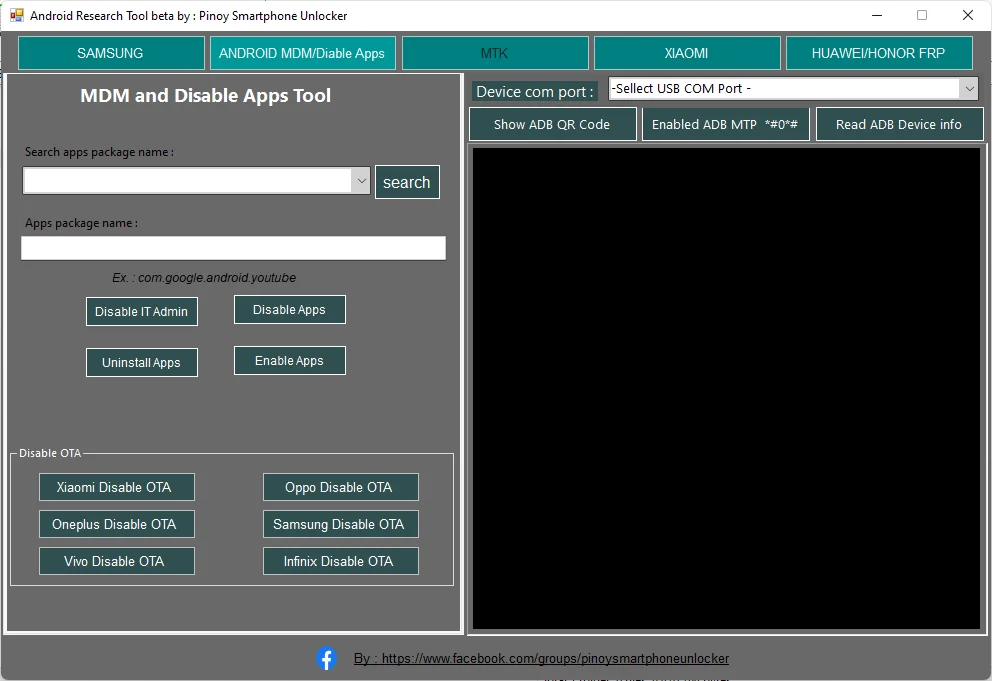
- The tool is reported to display installed applications, including disabled applications and certain device administrator apps. Depending on device permissions and connection mode, available actions may include enabling, disabling, or uninstalling selected applications.
- Users should exercise caution when changing system applications. Disabling or removing an essential component can cause unexpected errors, interfere with updates, or affect important phone functions.
3. Device Administrator and MDM App Identification
- Android Research Tool includes options for locating applications associated with device administration and mobile device management (MDM). These features can help technicians investigate managed devices and understand which applications may be controlling specific settings.
- On company-owned or school-managed devices, MDM restrictions should be handled through the authorized administrator. The presence of a management application does not automatically mean it is safe to remove.
4. Samsung Device Functions
- The published feature list includes Samsung-related options involving Factory Reset Protection (FRP) and ADB-based servicing. Actual availability can vary significantly according to the device model, Android release, security patch level, and whether authorized debugging access is available.
- FRP is an anti-theft security feature. If a Samsung phone requests the previously synchronized Google account after a reset, the recommended approach is to recover that account or contact an authorized service provider with proof of ownership.
5. Xiaomi Device Management
- The software is also advertised with Xiaomi-related functions for identifying update packages and handling selected account-related servicing tasks through supported connection modes. Compatibility is not universal, and some functions described by third-party distributors may be limited on newer MIUI or HyperOS versions.
- Before performing any operation, confirm the exact model and software version. Incorrect servicing procedures can cause data loss or make a device difficult to recover.
6. OTA Update Package Identification
- Android Research Tool reportedly identifies update-related packages associated with several manufacturers, including Xiaomi, OnePlus, Vivo, Oppo, Realme, Samsung, and Infinix. This can assist technicians who need to investigate the package responsible for software-update notifications or related device behavior.
- Over-the-air (OTA) updates often contain important security fixes. Disabling an update component may prevent normal update checks or delay security improvements, so this should only be done when there is a clear and legitimate troubleshooting reason.
7. Huawei and Honor Options
- The published description also mentions selected Huawei and Honor servicing functions, including FRP-related options. Supported operations may depend on the device’s software version and available authorization. Users should verify compatibility before attempting any service operation.
How to Use Android Research Tool on Windows?
Before using the utility, make sure you have a compatible Windows computer, a reliable USB cable, and the correct USB drivers for your Android device.
- Obtain the software package from a source you trust and scan the downloaded archive with reputable security software.
- Extract the package into a dedicated folder on your computer.
- Review the included files and instructions before launching the executable.
- Open the program with the permissions required for its intended functions.
- Connect your Android device using the connection mode supported by the task. Enable USB debugging only when appropriate and when you understand the security implications.
- Confirm that the software recognizes the device before selecting any operation.
- Read the displayed instructions carefully, and back up important information before making system-level changes.
The exact setup process may differ between releases. Do not assume that every feature will work on every Android device.
System Requirements and Compatibility:
Android Research Tool is distributed as a Windows utility. The precise Windows versions, processor architecture, required drivers, and supported Android devices should be confirmed from the documentation included with the specific release.
Compatibility can depend on several factors:
- Android version and security patch level
- Manufacturer and exact model number
- USB driver installation and connection mode
- ADB authorization and debugging settings
- Device administrator policies
- Availability of the required permissions or service authorization
A feature appearing in the program does not guarantee that it will work with a particular handset.
Advantages of Android Research Tool:
The main advantage of the tool is its collection of device-management and diagnostic functions in a single Windows interface. Application package searches and lists of disabled or administrator apps can help technicians investigate unfamiliar software components more efficiently. Manufacturer-specific package identification may also assist with certain troubleshooting tasks.
However, advanced Android servicing utilities are not risk-free. Some operations can change system behavior, affect software updates, remove important applications, or cause data loss. Users should understand each operation before proceeding.
Important Safety Recommendations:
Download the program only from a source you trust, and scan all files before running them. Avoid unofficial repacks that request unnecessary permissions or ask you to disable antivirus protection. Create a backup before modifying applications or system settings.
For account locks, FRP, and organization-managed devices, use official account recovery, the previous owner’s authorized removal process, or the responsible organization’s administrator. Do not use servicing features to access devices without permission.
Final Words:
Android Research Tool is a Windows-based utility focused on Android application inspection, package identification, device administration, and selected manufacturer-specific servicing functions. Its reported features may be useful for mobile technicians who need to investigate installed apps or troubleshoot supported Android devices. Before downloading or using it, verify the source, release details, compatibility, and security requirements. Careful preparation and authorized use can help reduce the risk of data loss and unexpected device problems.