Preloader Downloader Tool Free Download For Windows 2026
Preloader Downloader Tool Free Download – MediaTek Preloader Analyzer
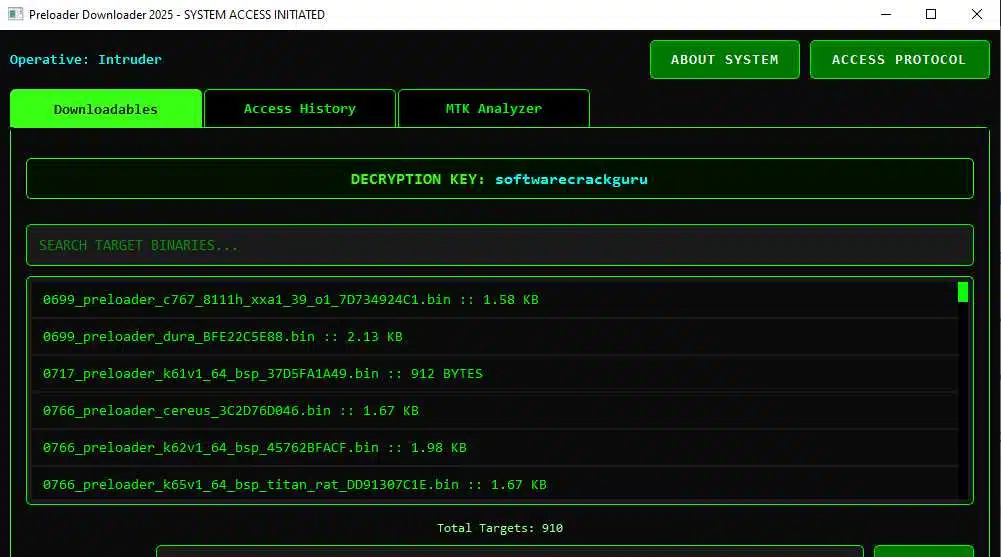
Preloader Downloader Tool Free Download is a Windows utility designed to help users work with preloader files associated with MediaTek-powered Android devices. It is intended for mobile repair technicians, developers, and advanced users who need to inspect firmware components or analyze preloader files during troubleshooting. The tool’s advertised features include a dedicated MTK Analyzer section, file analysis progress updates, and improvements intended to make the interface more responsive. Before using it, users should verify the software version, supported file formats, and compatibility with their Windows system.
What Is Preloader Downloader Tool?
Preloader Downloader Tool Free Download is a desktop application associated with MediaTek firmware analysis and device maintenance. A preloader is an important low-level component involved in the startup process of many MediaTek devices. Understanding its role can help technicians investigate certain firmware and boot-related problems.
The tool’s published description highlights an MTK Analyzer feature for examining compatible preloader files. This can provide a more convenient way to inspect firmware components without switching between multiple applications. However, analyzing a file does not automatically mean that the software can repair every device or recover every damaged firmware installation.
Key Features of Preloader Downloader Tool:
1. MTK Preloader File Analysis
- The advertised MTK Analyzer tab allows users to examine supported MediaTek Preloader files within the application. This can be useful for technical investigation, firmware research, and identifying information contained in compatible files. Results depend on the file format and the analysis functions implemented in the installed release.
2. Live Analysis Progress
- The tool’s published feature notes describe live updates in the analyzer interface while a file is being processed. Progress information helps users understand whether an analysis is still running and makes longer operations easier to monitor.
3. Integrated Interface
- The analyzer is designed to work within the existing application interface. Keeping related functions in one place can make routine inspection more convenient for users who regularly work with MediaTek firmware files.
4. Performance and Stability Improvements
- The published changelog mentions stability fixes and responsiveness improvements. These changes are intended to make the interface more usable during analysis, although performance can still depend on the computer, file size, and software version.
5. Support for Firmware Troubleshooting Workflows
- Preloader inspection can form part of a broader Android firmware troubleshooting process. Technicians may use the information gathered to investigate boot problems or compare firmware components. Any conclusions should be checked against reliable device documentation and the exact model variant.
Why Is a MediaTek Preloader Important?
The Preloader Downloader Tool Free Download participates in the early startup process on many MediaTek-powered devices and helps prepare the hardware for later boot stages. Problems involving firmware components, incompatible files, or interrupted software operations can sometimes affect a phone’s ability to start correctly.
Preloader files are device-specific components, so selecting a file merely because it belongs to the same manufacturer or chipset family is not sufficient. Incorrect low-level firmware operations can leave a phone unable to boot or communicate normally with a computer. Keep an original copy of any file being examined and avoid modifying or flashing it unless the device and procedure are clearly supported.
System Requirements and Preparation:
Before installing Preloader Downloader Tool, check the release information for supported Windows versions and any required runtime components. Use a computer with sufficient free storage and install software only from a source you can verify.
For file analysis, keep an untouched copy of the original preloader file. If your broader repair workflow involves connecting a phone, use the appropriate drivers from a trusted source and confirm that they match the device and Windows environment. Driver installation alone does not guarantee that a phone will be detected in every service mode.
How to Use Preloader Downloader Tool Responsibly?
Begin by confirming that the downloaded package is authentic and that the software supports the file you want to examine. Open the analyzer and select only a compatible file for inspection. Review the output carefully and preserve the original file so that the analysis does not interfere with your backup.
If you intend to use the results for a repair, verify the phone’s complete model number, chipset, regional variant, and firmware build. Do not use an unfamiliar preloader file or proceed with a low-level write operation based solely on a filename or an unverified online recommendation.
Is Preloader Downloader Tool Free and Safe?
The tool is promoted on third-party websites as a free download, but users should confirm the current release and its licensing terms. The availability of an installer does not establish that every copy is genuine or safe.
Scan downloaded files with reputable security software, avoid modified packages from unknown sources, and do not disable Windows security protections to run an unverified executable. If the publisher’s identity, file integrity, or compatibility details cannot be established, it is safer not to install the package.
Final Words:
Preloader Downloader Tool Free Download is a MediaTek-oriented utility whose published features focus on preloader file analysis and an integrated MTK Analyzer interface. It may be useful for technical inspection and firmware research, but its capabilities should not be confused with guaranteed device repair or universal flashing support. Verify the software source, preserve original files, and confirm device compatibility before using any findings in a repair workflow.