TFT Unlocker Tool V6.2.1.1 Download Ultimate Solution to Unlock Any Android Device Latest Version 2026
TFT Unlocker Tool v6.2.1.1 – Ultimate Android Unlocking and Repair Solution
TFT Unlocker Tool V6.2.1.1 Download is a Windows-based mobile servicing utility designed for technicians and advanced users who work with Android smartphones from different manufacturers. It brings together various device-management, firmware-related, diagnostic, and recovery functions in one interface. The tool is associated with support for brands such as Samsung, Xiaomi, Oppo, Vivo, Huawei, Realme, Tecno, and Infinix, depending on the available module and device configuration. TFT Unlocker Tool is intended to simplify selected mobile repair tasks, but its capabilities are not universal. Users should verify compatibility with their exact phone model, chipset, security patch, and software version before using it.
What Is TFT Unlocker Tool v6.2.1.1?
TFT Unlocker Tool V6.2.1.1 Download is a mobile servicing program used in Windows environments to access supported phone functions and perform selected maintenance operations. It is designed to bring several technical utilities together, reducing the need to switch between different programs for every task.
Depending on the module and device, its advertised capabilities include reading device information, firmware servicing, factory-reset functions, bootloader-related operations, and troubleshooting certain activation or account-verification issues. Supported operations can differ significantly between manufacturers and models.
The v6.2.1.1 release is associated with a range of Android servicing features. Before downloading this particular version, users should confirm that it is appropriate for their device and that the package comes from a trustworthy source.
Key Features of TFT Unlocker Tool v6.2.1.1:
1. Multi-Brand Android Support
- TFT Unlocker Tool V6.2.1.1 Download is promoted for use with various Android manufacturers, including Samsung, Xiaomi, Oppo, Vivo, Huawei, Realme, Tecno, and Infinix. The available functions depend on the device’s chipset, firmware, security configuration, and supported connection mode.
2. Device Information Reading
- Supported modules can retrieve selected information about a connected smartphone. Device information can help technicians identify the model and software configuration before selecting an appropriate maintenance procedure.
3. Firmware and Flashing Utilities
- Firmware-related functions can assist with certain software recovery and maintenance tasks on compatible devices. Correct firmware selection is essential because an incompatible package can cause boot problems, data loss, or other device issues.
4. Fastboot and Recovery Support
- The tool advertises functions associated with supported Fastboot and recovery environments. These modes are commonly used for device maintenance, diagnostics, and certain firmware operations. Their availability depends on the phone’s hardware and software configuration.
5. Qualcomm and MediaTek Modules
- TFT Unlocker Tool V6.2.1.1 Download includes modules associated with chipsets such as Qualcomm and MediaTek, with additional functions advertised for other supported platforms. Different chipsets require different drivers, connection methods, and compatible servicing files.
6. Samsung Servicing Functions
- Selected releases advertise Samsung-related servicing capabilities for compatible models. Available operations can vary by model, firmware revision, security patch, and connection mode, so users should consult the relevant compatibility information before proceeding.
7. Troubleshooting and Recovery Utilities
- The tool may offer selected reset, diagnostic, and recovery functions for supported devices. These functions can be useful in legitimate repair scenarios, but some operations erase user data or change important device settings.
8. A Unified Windows Interface
- By bringing multiple servicing modules into one program, TFT Unlocker Tool can make it easier for technicians to organize their workflow. However, the presence of a feature in the interface does not mean that it will work on every connected phone.
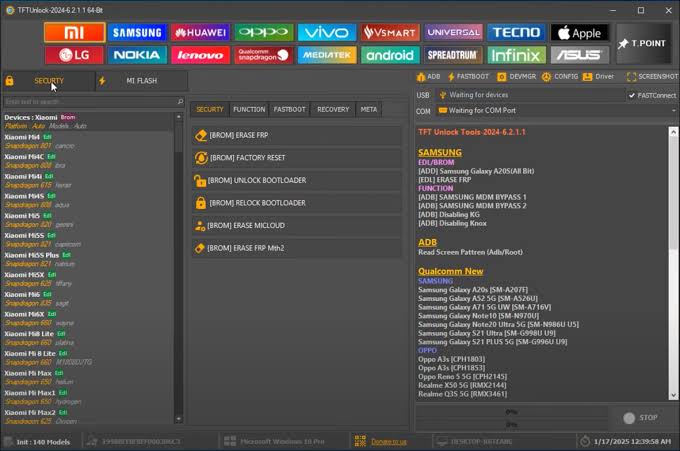
Supported Devices and Compatibility:
TFT Unlocker Tool V6.2.1.1 Download is advertised for a range of Android manufacturers and chipset families. Actual support should be checked individually rather than assuming that every device from a listed brand is compatible.
Before using the software, verify:
- The exact phone model and model number.
- The chipset platform, such as Qualcomm or MediaTek.
- The installed firmware and Android version.
- The security patch and bootloader state, where relevant.
- The required USB drivers and connection mode.
- Whether the selected function is supported by the specific release.
Newer security updates may change the availability of certain operations. A function that works on one firmware revision may not work on another, even when both phones have the same model name.
System Requirements:
Before running TFT Unlocker Tool on a Windows computer, check the requirements provided with the specific release.
- Operating system: A compatible Windows version, with Windows 10 or 11 suitable for many modern servicing setups.
- USB connection: A reliable data-transfer cable.
- Device drivers: Manufacturer or chipset drivers when required.
- Storage space: Sufficient free space for the program and any firmware files.
- Permissions: Appropriate computer permissions to run the software and access required drivers.
- Internet connection: May be needed for updates, online services, or certain program functions.
The precise requirements can vary by package and module. Confirm them before installing the software.
How to Prepare for TFT Unlocker Tool?
Step 1: Verify the Software Package
Obtain the program from a source you can verify. Check the version number and scan downloaded files with trusted security software before running them.
Step 2: Identify Your Device
Confirm the phone’s model, chipset, and software configuration. This helps you avoid selecting an incompatible module or firmware package.
Step 3: Install the Required Drivers
Install appropriate USB drivers when necessary. A correct driver setup helps Windows recognize the phone in the supported connection mode.
Step 4: Back Up Important Data
Back up photos, contacts, documents, and other important files whenever the phone remains accessible. Factory resets, firmware operations, and some repair procedures may erase stored information.
Step 5: Choose the Appropriate Servicing Function
Review the program’s documentation and select only a function that is supported for your device and intended repair. Do not modify security settings or protected account information unless you own the device or have explicit authorization to service it.
Common Problems and Solutions:
Device Not Detected
Check the USB cable, computer port, device drivers, and phone connection mode. Some operations require a particular device state, so consult the documentation for the selected module.
Unsupported Model or Security Version
A phone may not be supported even if its manufacturer appears on the tool’s compatibility list. Verify the exact model and firmware revision before trying another supported maintenance option.
Firmware Flashing Errors
Flashing failures may result from incorrect firmware, missing drivers, connection interruptions, or incompatible device configurations. Stop if the program reports a mismatch rather than repeatedly attempting the same operation.
Software Does Not Launch
Check the Windows requirements and confirm that the package has downloaded correctly. Avoid unofficial modified builds that ask you to disable security protections or install unknown components.
Data Loss After a Reset
Some reset and recovery operations erase user information. Review the warnings shown by the program and make sure you have a backup before proceeding whenever possible.
Important Safety and Security Notes:
TFT Unlocker Tool V6.2.1.1 Download should be used carefully because mobile servicing software can make significant changes to a phone’s software and settings. Account-protection features, including Google Factory Reset Protection (FRP), are designed to help prevent unauthorized access after a reset.
If a phone requests verification of a previously associated account, use the manufacturer’s official account-recovery process or contact the previous owner when appropriate. For company-managed devices, contact the organization’s administrator.
Avoid assuming that the tool can unlock every Android device, remove every restriction, or preserve all user data. Always verify the exact supported operation before making changes.
Final Words:
TFT Unlocker Tool V6.2.1.1 Download is a multi-brand Windows utility intended for selected Android servicing, diagnostic, firmware, and recovery tasks. Its broad range of advertised modules can be useful to mobile technicians who need to work with different device platforms. However, compatibility depends on the phone model, chipset, firmware, and security configuration. Verify the software source, review the requirements, and back up important information before beginning any repair. Using the correct procedure for the specific device is the best way to reduce avoidable errors and data loss.