 Posted by
MDM Fix Tool v1.0.9.9 Latest Version Free Download
MDM Fix Tool v1.0.9.9 is a mobile servicing utility designed for selected Android devices experiencing Mobile Device Management (MDM), IT Admin, Knox Guard (KG), and other software-related restrictions. It is associated with device maintenance functions such as firmware flashing, device detection, diagnostics, and selected reset operations. The tool is promoted for use with supported Samsung, Xiaomi, and other Android devices, although available features depend on the release, chipset, security patch, and licensing requirements.
What Is MDM Fix Tool?
MDM Fix Tool v1.0.9.9 is a Windows-based utility intended for mobile repair technicians and authorized device administrators. It brings different servicing functions into one interface and may support multiple device connection modes, depending on the installed version.
Mobile Device Management is commonly used by businesses, schools, and other organizations to configure and manage company-owned devices. Knox Guard and similar systems can also enforce device or payment-related restrictions. These protections are separate from ordinary screen locks, so the correct solution depends on the type of restriction and who manages the device.
Key Features of MDM Fix Tool:
1. MDM and IT Admin Troubleshooting
- MDM Fix Tool is advertised for handling certain MDM and IT Admin-related device problems. Support varies by device model and Android version. For company-managed devices, the preferred route is to contact the organization’s administrator and request authorized removal or release from management.
2. Knox Guard Compatibility
- Some versions advertise servicing functions for selected Samsung devices affected by Knox Guard restrictions. Actual compatibility depends on the model, firmware, security patch, and tool release. Users should verify support before attempting any maintenance operation.
3. Firmware Flashing Support
- The tool’s advertised feature set includes firmware-related functions for compatible devices. Correct firmware selection is essential because packages designed for a different model or hardware revision can cause software failures or data loss.
4. Device Detection and Connection Modes
- Depending on the release, MDM Fix Tool may offer device-detection and servicing options for supported interfaces such as ADB, MTP, Download Mode, or EDL. Required drivers and connection procedures differ between chipsets and models.
5. Selected Android Device Maintenance
- Some versions advertise factory reset, FRP-related servicing, and other repair utilities for supported Android devices. These functions are not universally available, and operations that erase data should only be performed after considering backup and recovery options.
6. Multi-Brand Support
- Public listings describe support for selected Samsung, Xiaomi, OPPO, Vivo, Tecno, Infinix, and other Android devices. This does not mean that every model from these brands is supported. Always consult the release’s device list before relying on a particular feature.
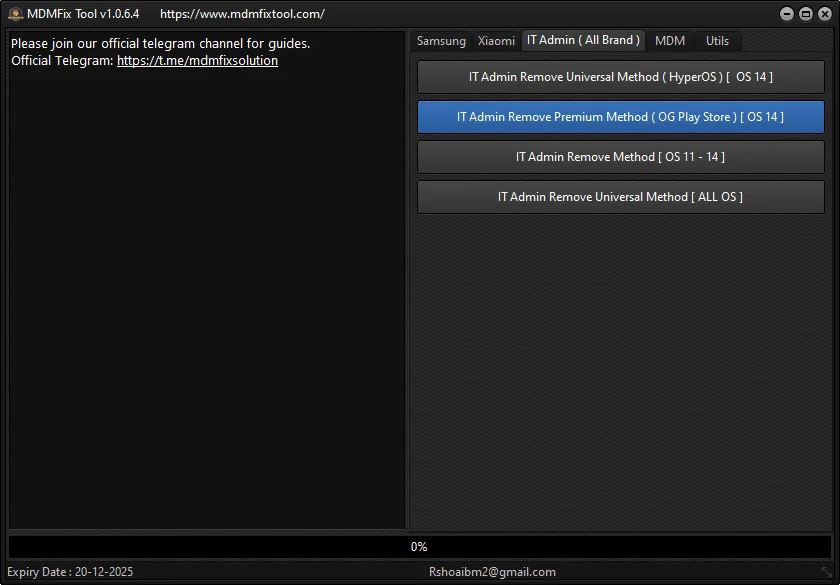
MDM Fix Tool v1.0.9.9: Version Information:
Version v1.0.9.9 has appeared in third-party download listings. However, the official MDM Fix Tool website now advertises v1.1.0.1. Anyone looking specifically for v1.0.9.9 should verify the version and source before installing it, particularly if the package is hosted by an unofficial website.
A newer version may include additional device support or fixes, but users should read the relevant release notes rather than assuming that every new feature applies to their device.
System Requirements:
Before setting up MDM Fix Tool, check the requirements for the exact release. A typical servicing environment may need:
- A compatible Windows computer.
- Appropriate USB drivers for the connected device.
- A reliable USB data cable.
- A supported phone model and connection mode.
- Stable internet access if online authentication or servicing is required.
- A valid licence or subscription if the release requires one.
Download software only from a source you can verify. Scan installation files before opening them and avoid unknown packages that request unrelated passwords or require disabling computer security protections.
Installation and Setup Preparation:
Confirm the software version and review its documentation before installing it. Make sure that the selected release supports your operating system and device, then install the necessary drivers according to the publisher’s instructions.
Back up important data where possible. Factory reset and firmware operations may erase personal information, and a backup may not be possible on a malfunctioning device. Do not interrupt an active firmware operation.
If the phone is managed by a company or school, obtain approval from the administrator before making changes to its management configuration.
Common Problems and Troubleshooting:
Device not detected: Check the USB cable, drivers, device connection mode, and compatibility with the installed version.
Firmware operation fails: Verify the exact model number and firmware package. Avoid repeatedly trying unrelated files.
MDM or IT Admin restrictions remain: Contact the organization that manages the device and request authorized release from its management system.
Knox Guard remains active: Confirm the device’s ownership and status with the seller, organization, or Samsung support as appropriate.
Licence or login error: Check the licence status and obtain installation files from the official provider or an authorized distributor.
Is MDM Fix Tool Free?
Availability varies by release and service. Some features may be available without additional charges, while other functions can require a subscription, licence, or paid servicing access. Confirm the terms before purchasing or sharing payment details.
Final Words:
MDM Fix Tool is a mobile servicing utility promoted for selected Android device maintenance, firmware operations, and MDM-related troubleshooting. Version v1.0.9.9 appears in third-party listings, while the official website advertises a newer release. Verify the download source, version, device compatibility, and licensing requirements before installation. For company-managed devices, use the administrator’s authorized release process to avoid disrupting legitimate management or data access.