ArssaTech GSM Tool V3.0 Download Unlock & Flash Your Device Latest Version 2026
ArssaTech GSM Tool V3.0 Download – Unlocking and Flashing Tool
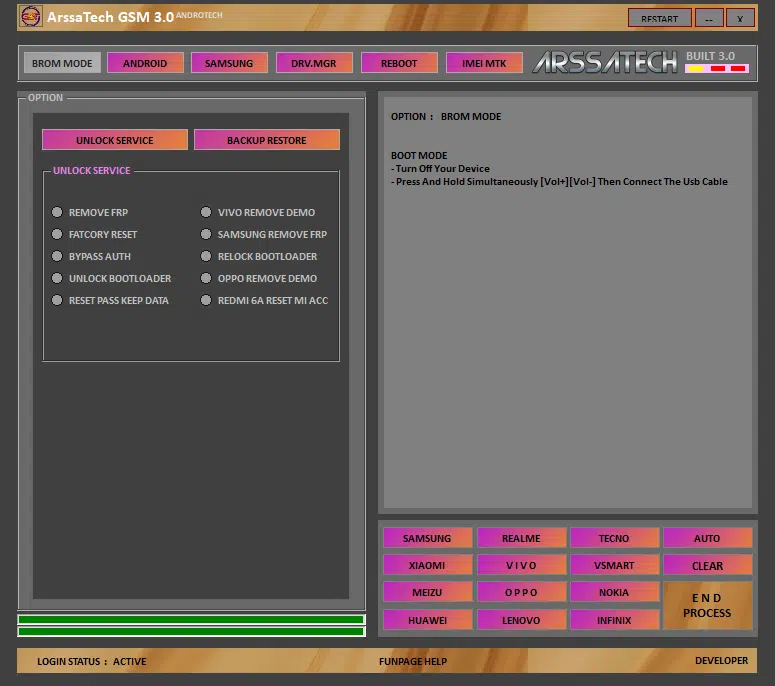
ArssaTech GSM Tool V3.0 is presented as a mobile servicing utility designed for technicians and advanced users who work with compatible Android devices. GSM tools are commonly used for device diagnostics, software maintenance, firmware-related tasks, and supported servicing operations. The tool’s exact features and compatibility may vary depending on the release, so users should review the included documentation before installing or using it.
What Is ArssaTech GSM Tool V3.o?
ArssaTech GSM Tool V3.0 is described as a device servicing solution for supported mobile phones. It may be useful in repair environments where technicians need to identify connected devices, review software information, troubleshoot common system issues, or perform compatible maintenance operations. Before using any function, confirm that the selected operation supports the exact phone model and software version.
Key Features of ArssaTech GSM Tool V3.0:
Device Detection and Information
- Device detection is an important part of mobile servicing. Depending on the release and supported hardware, the tool may provide information about a connected device to help technicians identify its model and servicing requirements.
Unlocking and Servicing Functions
- The Tool’s title highlights unlocking-related operations. Available functions can differ between versions and devices. Any unlocking or account-recovery procedure should be performed only on devices you own or are explicitly authorized to service, following the manufacturer’s supported recovery process where applicable.
Firmware Flashing Support
- Firmware flashing is used to install or restore compatible device software. A suitable servicing utility can help technicians manage supported software-maintenance workflows. Always use firmware intended for the exact device model and regional variant, and verify the package before starting an operation.
Android Software Troubleshooting
- Mobile servicing tools may assist with investigating software problems such as startup errors, failed updates, or system instability. The available diagnostic and repair functions depend on the tool’s actual implementation and supported devices.
Windows-Based Servicing Workflow
- If ArssaTech GSM Tool V3.0 is distributed as a Windows application, users should check its system requirements, required drivers, and installation instructions. A stable USB connection and a properly configured computer can help prevent interruptions during supported servicing tasks.
How to Prepare Before Using the Tool?
Before beginning any repair operation, follow these general precautions:
- Confirm the exact device model and hardware variant.
- Back up important user data whenever the device is accessible.
- Install appropriate USB drivers from a trusted source.
- Use a reliable USB cable and avoid disconnecting the device during an active operation.
- Verify that firmware files match the device and region.
- Read the included instructions and check compatibility before selecting a servicing function.
These precautions can reduce the risk of data loss, failed flashing, or software damage.
Common Problems and Troubleshooting:
Device not detected: Check the USB cable, USB port, device connection mode, and required drivers. Reconnect the device and restart the application if necessary.
Flashing operation fails: Verify the firmware package, device model, connection stability, and any documented prerequisites. Do not repeatedly attempt an operation if the cause of failure is unknown.
Application does not open: Confirm that your Windows version meets the stated requirements. If the application requires additional components, install them only from trusted sources.
Unexpected device behavior: Stop further operations and consult reliable device-specific repair documentation. For serious software problems, consider an authorized service center.
Advantages of Using a GSM Servicing Utility:
A compatible GSM servicing utility can help technicians organize common maintenance tasks in one workflow. Depending on its confirmed features, it may reduce the need to switch between separate applications for device identification, diagnostics, and supported firmware operations. However, performance and functionality should be evaluated using the actual release documentation rather than the tool name alone.
Safety and Compatibility Considerations:
Not every GSM utility supports every Android brand, chipset, or security version. Some operations may erase user data, affect device software, or require specialized technical knowledge. Download installation files only from a source you trust, scan files before running them, and avoid disabling security protections just to launch an unknown application.
Unlocking and account-related repairs should be limited to authorized devices. Do not use servicing software to access someone else’s data or defeat security protections without permission.
Final Words:
ArssaTech GSM Tool V3.0 is presented as a mobile servicing tool for users interested in compatible device unlocking, flashing, and software maintenance. Before installing it, confirm the authenticity of the setup file, review its actual feature list, and check device compatibility. Careful preparation, correct firmware selection, and responsible use are essential for a safer mobile repair process.